

Building a Resilient DevOps Culture: Best Practices for Uptime and Performance
- Watchman Tower Team
- Updated: October 1, 2026
- Category: Engineering
- Read Time: 5 min
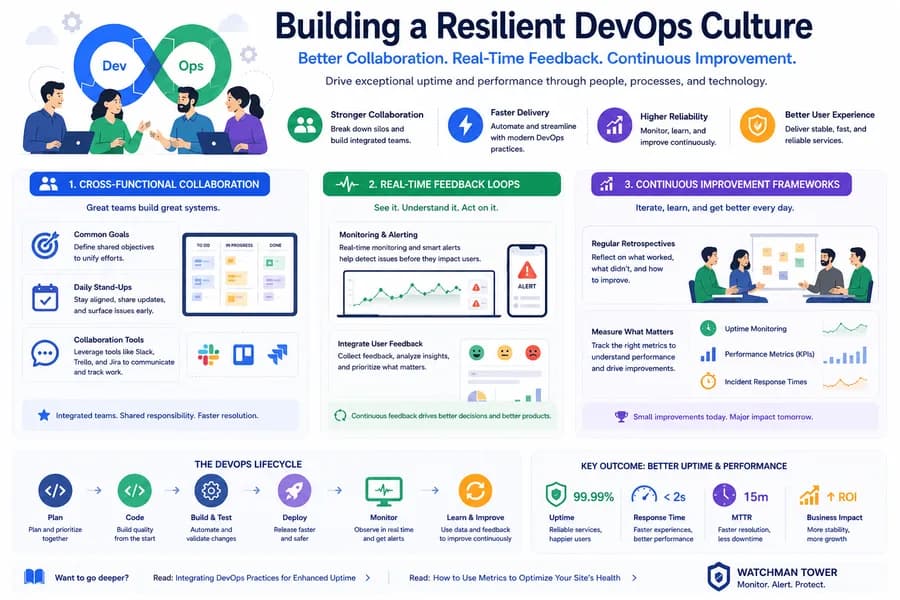
A resilient DevOps culture treats uptime as a shared responsibility. This guide covers the practices that make it work: shared ownership, monitoring tied to deployments, a clear incident path, and reviews that change something.
Fast delivery and reliable service are often presented as a trade-off. In practice, the teams that deploy most often also tend to recover fastest, because the same habits support both: small changes, quick feedback, and shared responsibility for what happens in production.
This guide covers the practices that connect a DevOps way of working to uptime and performance, and where monitoring fits in each of them.
Shared Ownership of Production
The core idea of DevOps is that the people who build a service also care about how it runs. When development and operations have separate goals, one side is rewarded for shipping and the other for stability, and incidents become a handover problem.
Shared ownership looks like this in practice:
- Common reliability goals. An agreed availability target and an agreed definition of "too slow" that both sides are measured against.
- Visible production data. Uptime, response time and incident history that everyone can see, not only the on-call engineer.
- Involvement in incidents. The people who wrote a change take part in resolving the problems it causes.
Small Changes and Automated Delivery
Continuous integration and continuous delivery reduce risk by making changes small. A deployment that contains one change is easy to reason about. When something breaks, the cause is usually the last thing that shipped, and rolling it back is quick.
Automation removes a second source of failure: manual steps. A deployment that runs the same way every time does not depend on someone remembering the order of commands late at night.
Neither practice prevents every incident. What they do is make incidents smaller and easier to trace, provided the team can see what happened after each release. That is where monitoring comes in.
Monitoring as the Feedback Loop
Tests show that a change works in a controlled environment. Monitoring shows what it does in production. A DevOps workflow needs both.
From Reactive to Proactive
Reactive monitoring confirms an outage after users have felt it. Proactive monitoring watches the signals that come first:
- Alerts for slow responses, not only for downtime
- Checks from more than one location, so regional problems are visible
- Health checks on the APIs and dependencies a service relies on
- Expiry tracking for SSL certificates and domains, which fail on a known date
How monitoring tools detect downtime explains these layers in detail.
Tie Monitoring to Deployments
The most useful question after a release is whether anything changed. Compare response time and error rates before and after each deployment, and keep deployment times next to the monitoring history. A response time that climbs steadily after a release is a regression, even if nothing is down. For the metrics worth comparing, see page speed monitoring.
Synthetic Checks and Real-User Data
Two kinds of measurement complement each other. Synthetic monitoring sends scripted requests at a fixed interval, so it works at any hour and detects problems even when there is no traffic. Real-user monitoring collects timings from actual visitors, so it shows how the site performs across real devices and networks. Synthetic checks are the better basis for alerting. Real-user data is the better basis for optimization.
Common Obstacles
| Obstacle | What it looks like | What helps |
|---|---|---|
| Too many tools | Uptime, SSL, domains and servers each tracked in a different place | Fewer tools that cover several layers together |
| Too much data | Dashboards nobody reads, alerts nobody acts on | A short list of metrics that lead to decisions |
| Unclear ownership | An alert fires and everyone assumes someone else has it | A named first responder and an escalation path |
| Alert fatigue | Frequent false alarms, so real ones are ignored | Confirmation before alerting and severity-based routing |
A Clear Incident Path
Incident response should be decided before the incident:
- Detection. External monitoring confirms the problem and alerts the team, ideally before users report it.
- Response. A named person takes the incident. Alerts arrive on the channels the team already uses, such as email, mobile push, Slack, SMS or a webhook into an existing workflow.
- Communication. Users are told what is happening through a public status page, so support is not answering the same question repeatedly.
- Recovery confirmation. The incident is closed when monitoring shows consistent healthy responses, not when a fix has been deployed.
- Review. The team looks at what happened and what will change.
Uptime monitoring alerts and escalation covers the routing side of this path.
Continuous Improvement
A resilient culture is one that learns from each incident.
Review Without Blame
A useful review asks what made the failure possible and how it was handled, not who caused it. People who expect blame hide information, and hidden information is what makes the next incident worse.
Measure What Changes
A few numbers show whether reliability is improving:
- Uptime against the agreed target
- Response time trends, including the slowest requests, not just the average
- Time to detect: how long a problem existed before someone knew
- Time to recover: how long from detection to consistent recovery
- Incident frequency, and whether the same causes repeat
Time to detect is usually the cheapest to improve, and it depends almost entirely on monitoring.
Act on the Review
A review that produces no change is a meeting. Each one should end with a small number of concrete actions: a new check, an adjusted threshold, an updated runbook, a fixed root cause.
Conclusion
A resilient DevOps culture is not a toolset. It is a set of habits: shared ownership of production, small automated changes, monitoring that closes the feedback loop, a response path agreed in advance, and reviews that lead to action. Monitoring matters in all of them, because none of the other habits work without knowing what production is actually doing. The uptime monitoring checklist is a practical place to start.
Free plan available. No credit card needed.