

Domain Expiry Reminders: How to Prevent Missed Renewals
- Watchman Tower Team
- Updated: October 1, 2026
- Category: Domain Monitoring
- Read Time: 5 min
Build a reliable domain expiry reminder strategy with the right timing, responsible owners, and escalation steps. This guide explains how organizations can reduce missed renewals by creating reminder workflows that provide visibility before expiration deadlines.
Domain expiry reminders are a critical part of preventing accidental domain loss. A reminder does not replace domain renewal management, but it creates the visibility needed to take action before a domain reaches its expiration date.
The challenge is that a single reminder is rarely enough. Missed emails, outdated contacts, unclear ownership, and delayed approvals can all cause renewal tasks to remain unresolved until the deadline becomes urgent.
A reliable reminder strategy creates multiple opportunities to review, approve, and complete renewals before they become operational incidents.
Why Domain Expiry Reminders Matter
Domains usually do not expire because organizations are unaware that renewal exists. They expire because important signals are missed, ignored, or delivered to the wrong person.
A good reminder system helps organizations:
- Create enough time to resolve billing or access problems.
- Assign responsibility before the deadline becomes urgent.
- Reduce dependence on a single email notification.
- Maintain visibility across multiple domains.
- Prevent last-minute renewal decisions.
The purpose of reminders is not simply to announce an expiration date. The purpose is to create a reliable operational process around that date.
Why Single Domain Expiry Reminders Are Not Enough
Many domain registrars provide expiration notifications, but relying on a single reminder creates several risks.
A single notification can fail because:
- The email address is outdated.
- The message is filtered as spam.
- The recipient no longer manages the domain.
- The organization lacks a backup owner.
- The reminder arrives too close to the expiration date.
Important domains should not depend on one message, one inbox, or one person, especially considering the significant cost of losing a domain.
Common Domain Expiry Reminder Methods
Registrar Email Reminders
Registrar notifications are the most common form of domain expiry reminder. They are useful because they come directly from the provider managing the registration.
However, registrar emails should be considered one reminder source rather than a complete renewal process.
Their limitations include:
- Limited control over timing.
- Dependence on registrar account contacts.
- No guarantee that someone completed the required action.
- Limited visibility across multiple registrars.
Registrar reminders are valuable, but critical domains benefit from additional independent reminders.
Calendar and Task Reminders
Calendar reminders transform expiration dates into scheduled tasks. They allow teams to assign responsibility and create internal deadlines before the actual expiration date.
A calendar-based approach works well for small portfolios, especially when ownership is clear.
However, calendar reminders require manual maintenance. If the expiration date changes or responsibility changes, the reminder may become outdated.
Automated Domain Expiry Alerts
Automated expiry alerts provide continuous visibility by checking domain status and notifying responsible users according to predefined schedules.
They are especially useful when:
- Multiple domains are managed.
- Domains exist across different registrars.
- Several team members share responsibility.
- Renewal failures would create significant business impact.
Automation reduces manual tracking effort, but alerts still require clear ownership and an established response process.
Choosing the Right Domain Expiry Reminder Schedule
The ideal reminder schedule depends on the importance of the domain, the size of the portfolio, and the complexity of the renewal process.
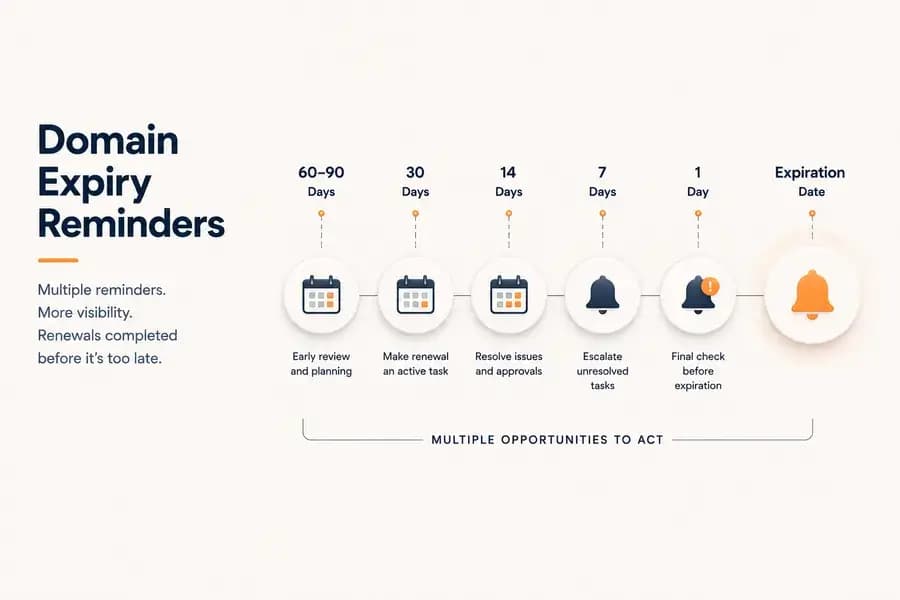
A common operational approach uses multiple reminder points:
60–90 Days Before Expiration
Early reminders create time to review ownership, budget approval, payment methods, and renewal decisions.
This stage is especially useful for organizations managing many domains or domains requiring internal approval.
30 Days Before Expiration
At this point, renewal should become an active task rather than a future consideration.
Teams should confirm that no blockers remain and that the responsible person has started the renewal process.
14 Days Before Expiration
A second reminder helps identify unresolved issues such as payment failures, missing access, or delayed approvals.
7 Days Before Expiration
This reminder acts as an escalation point. Any unresolved renewal issue should receive additional attention.
1 Day Before Expiration
A final reminder provides a last opportunity to confirm that renewal has been completed or that urgent action is required.
Reminder Ownership and Escalation
A reminder system is only effective when alerts lead to action.
Every important domain should have:
- A responsible owner.
- A backup contact.
- A defined escalation path.
- A clear expected action after receiving the reminder.
Without ownership, additional reminders only create more notifications without improving reliability.
A strong escalation process answers simple questions:
- Who receives the first reminder?
- When does an unresolved reminder escalate?
- Who takes responsibility if the primary owner is unavailable?
Avoiding Notification Fatigue
More reminders do not always create better protection. Excessive alerts can cause teams to ignore important notifications because every message appears equally urgent.
Effective reminder systems balance frequency with relevance.
Good reminder practices include:
- Using different urgency levels throughout the renewal window.
- Sending notifications only to responsible people.
- Escalating unresolved issues rather than repeating identical alerts.
- Reducing unnecessary notifications for low-risk domains.
Domain Expiry Reminder Best Practices
- Do not rely on a single reminder source; implement a comprehensive domain expiry checklist to standardize renewal processes.
- Start reminders early enough to resolve problems.
- Assign every alert to a responsible owner.
- Use escalation for unresolved renewal tasks.
- Separate low-risk and critical domain reminder policies.
- Review reminder recipients regularly.
- Confirm completed renewals instead of assuming success.
- Keep reminder schedules aligned with current expiration dates.
Conclusion
Domain expiry reminders are not simply notifications about a future date. They are an operational safeguard that gives teams enough time to identify problems, assign responsibility, and complete renewals before expiration creates disruption.
A reliable reminder strategy combines multiple warning points, clear ownership, and appropriate escalation. Whether managed manually or through automation, effective reminders transform domain renewal from a last-minute task into a predictable operational process.
Free plan available. No credit card needed.
Want a Dedicated Expiry Monitoring Tool?
Don’t rely only on registrar emails. Watchman Tower gives you automatic expiry alerts across all registrars, with reminders at 30, 14, 7, 3, and 1 day before expiry.
Learn more about Domain Expiry Monitoring →FAQ
What problems can occur if I forget to renew my domain?v
Why aren't one or two reminder emails from my registrar sufficient?v
What is a safer approach for domain expiry reminders?v
How can I make domain expiry reminders more effective?v
How does Watchman Tower handle domain expiry reminders?v
Blog Posts
What Happens When a Domain Expires and Someone Else Registers It...
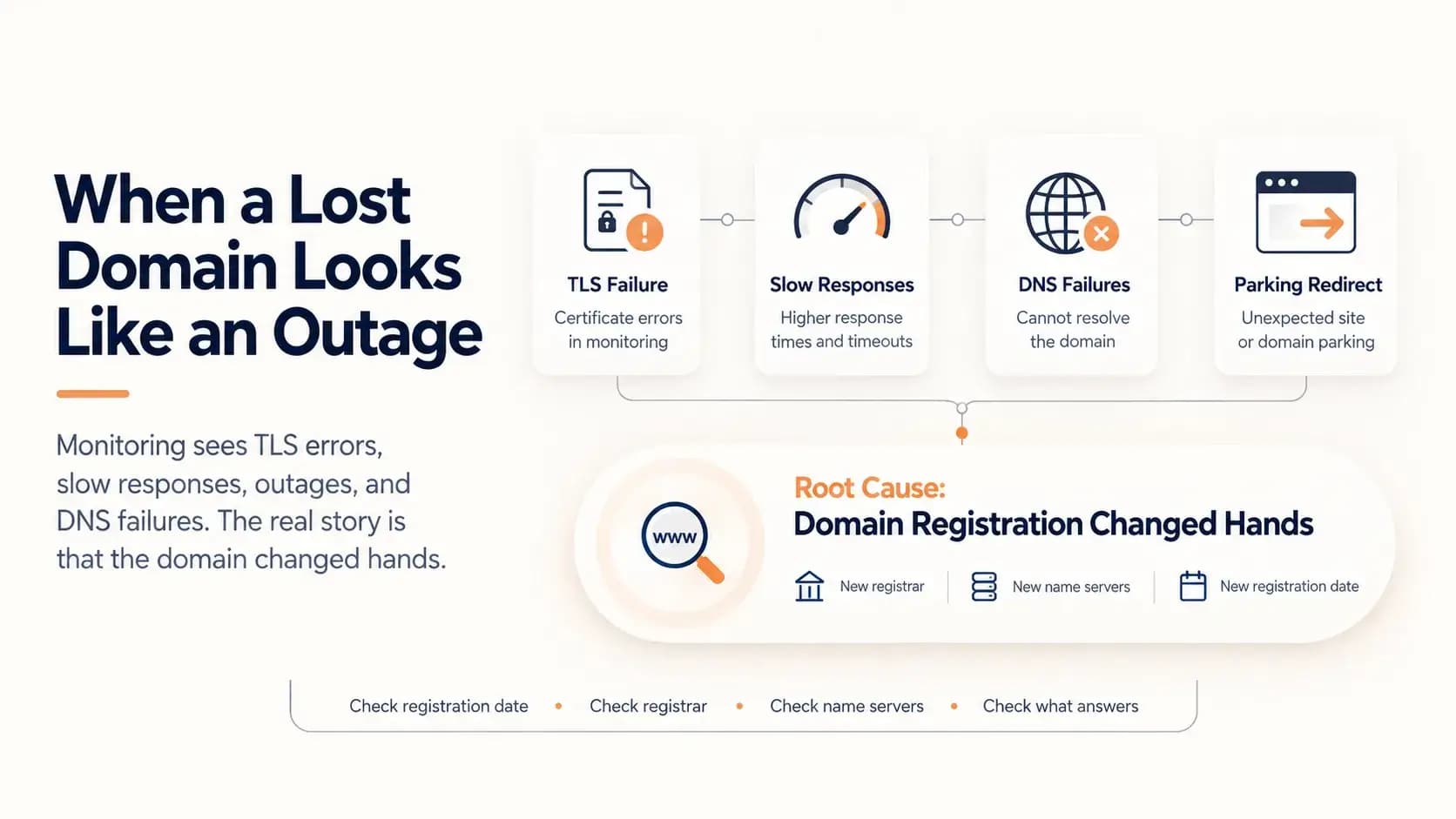
A domain that lapses and is registered by someone else does not look like a lost domain. It looks like a certificate error, slow responses, an outage and DNS failures. This case follows one such domain through five weeks of accurate but misleading alerts, and shows how to tell the difference.
Learn more about What Happens When a Domain Expires and Someone Else Registers It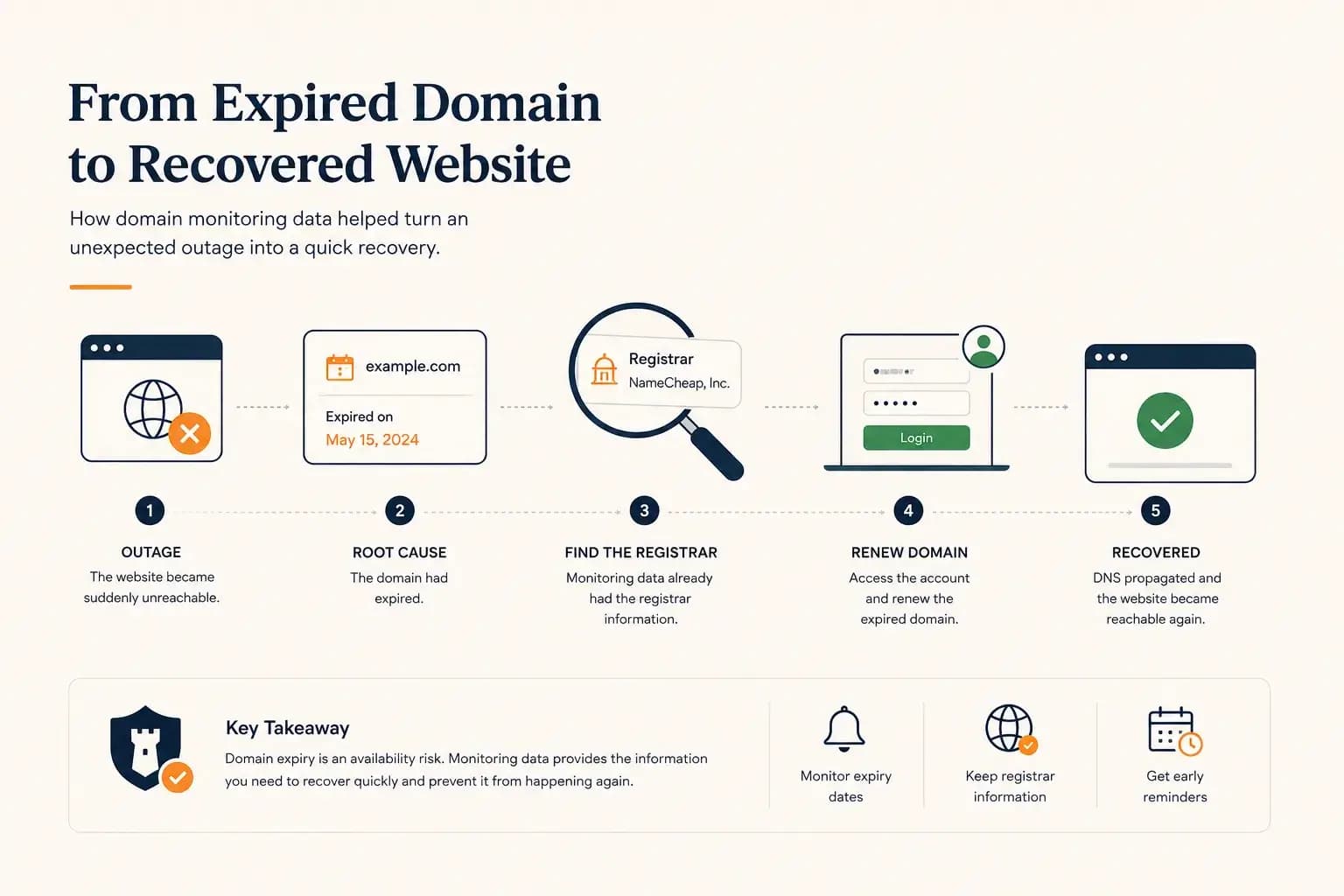
The Website Went Down — and the Owner Didn’t Know Where the Domain Was Registered...
A real-world expired domain recovery case: how a website went offline, how we identified the registrar from monitoring data, and how the domain was renewed before it was lost.
Learn more about The Website Went Down — and the Owner Didn’t Know Where the Domain Was Registered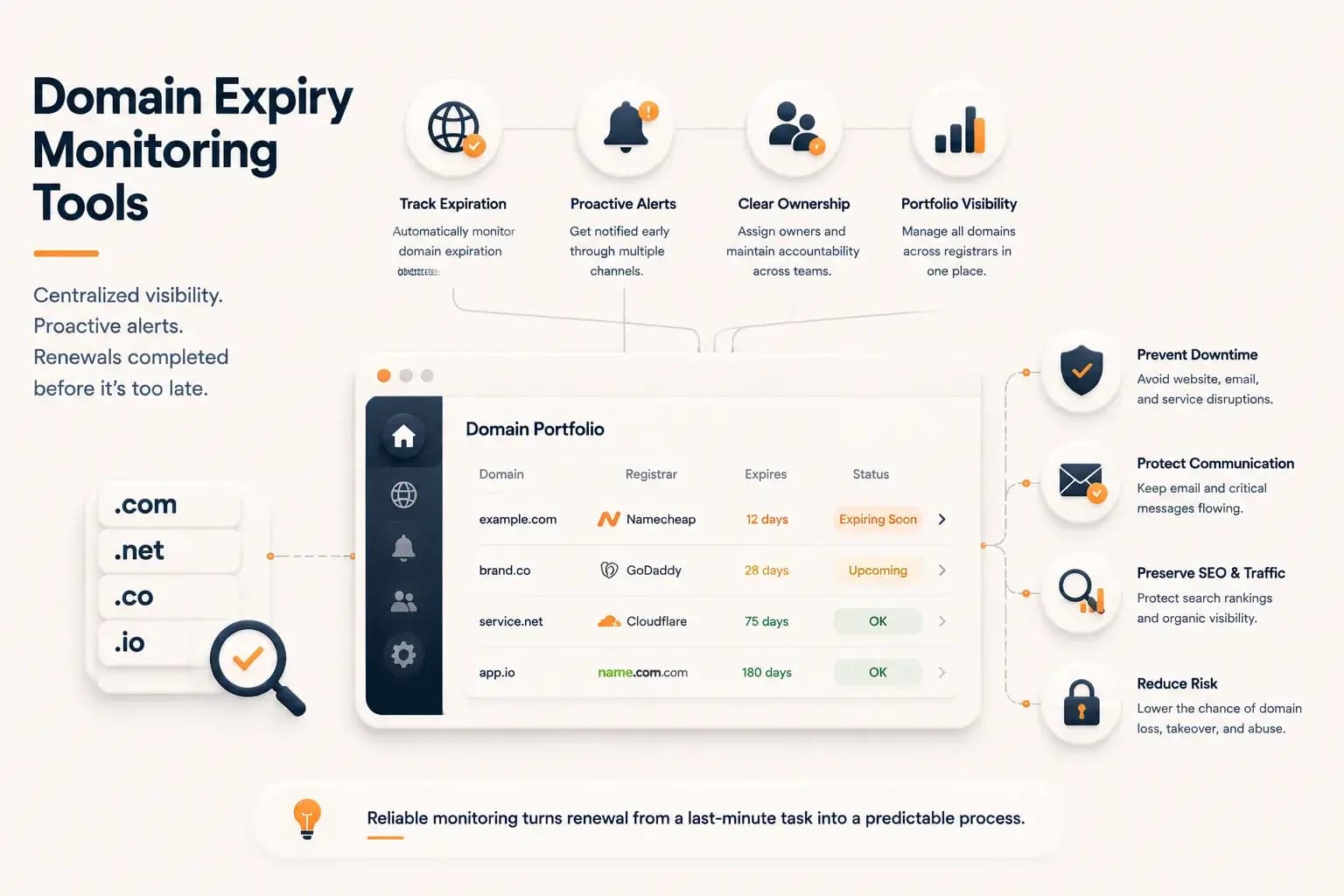
Best Domain Expiry Monitoring Tools: How to Choose the Right Solution...
Explore how domain expiry monitoring tools help organizations track renewal risks, manage multiple domains, and choose the right solution based on visibility, automation, and operational needs.
Learn more about Best Domain Expiry Monitoring Tools: How to Choose the Right Solution