

Server Monitoring
- Updated: July 21, 2026
- Read Time: 2 min
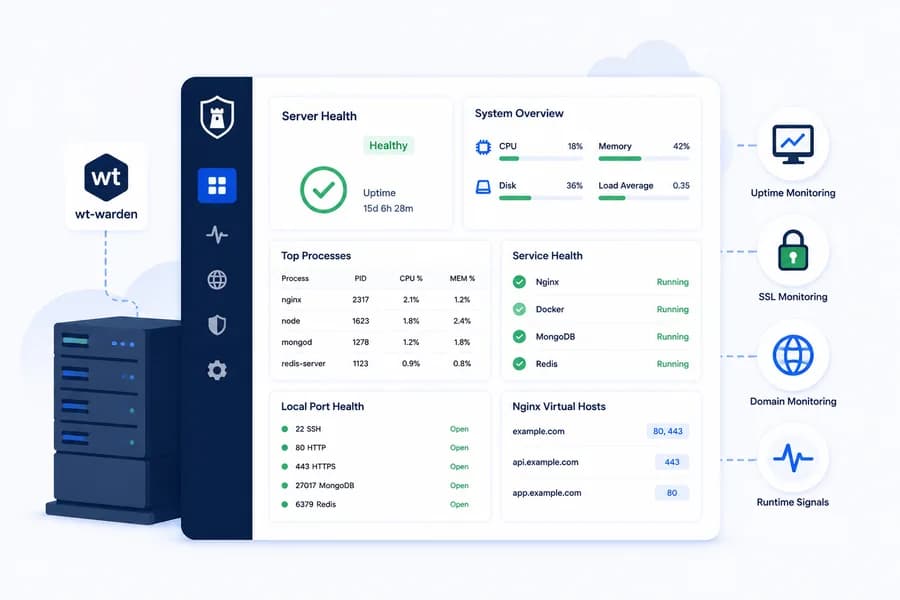
Go beyond basic CPU and memory charts. Watchman Tower helps you monitor server health with host metrics, process visibility, service status, port checks, and runtime signals from components like Nginx, Docker, MongoDB, and Redis.
Monitor Servers Alongside Your Websites
Watchman Tower brings server monitoring and website monitoring into the same workflow. With wt-warden, you can collect host metrics and runtime health signals directly from your server while continuing to track uptime, SSL, and domain health from the outside.
What You Can Monitor
- CPU, memory, disk, load, uptime, and swap usage
- Top processes with PID, CPU usage, and memory usage
- Service health for Nginx, Docker, MongoDB, and Redis
- Local port health for key services
- Runtime summaries for selected infrastructure components
- Nginx virtual host discovery, including detected server names and listen ports
- Agent version and host platform details
Why It Matters
Most server issues do not start and end with CPU graphs. A service can fail while the host still looks healthy, or traffic can break because a local port stops listening. Watchman Tower helps you understand whether a problem is host-level, service-level, or related to the runtime actually serving your traffic.
Designed for Practical Server Visibility
wt-warden is intentionally lightweight. It gives you useful host and runtime signals without forcing you into a heavyweight observability stack. That makes it a strong fit for teams who want clearer server visibility without a complicated rollout. If you want the agent perspective, read How a Lightweight Server Agent Fits Into a Modern Monitoring Workflow.
Fast Installation
You can install wt-warden from the server configuration screen with a one-line command. The recommended installer downloads the binary, writes the environment file, creates the systemd service, and starts it automatically. If you want the installation flow in more detail, see the server agent installation guide and the server agent overview.
Part of the Bigger Monitoring Picture
Server monitoring in Watchman Tower works best when combined with uptime checks, SSL visibility, domain monitoring, and internal runtime signals. That way, you are not just alerted that something is wrong. You can also see where to look first.
Continue Reading
Start with What Is Server Monitoring?, then explore the metrics that actually matter, why service health matters, port monitoring vs service monitoring, and how to monitor Nginx health. You can also browse the full Server Monitoring hub.
Check your website's health in seconds
Uptime · Response time · SSL · WordPress detection
Free plan available. No credit card needed.