

WordPress Monitoring for Uptime, Performance and Site Health
- Updated: October 2, 2026
- Read Time: 8 min
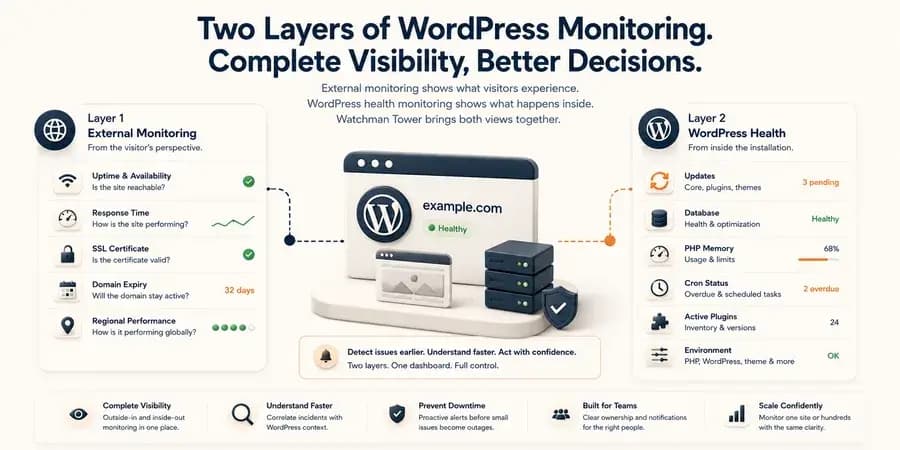
Watchman Tower combines external WordPress monitoring with optional internal health signals. Track uptime, response time, SSL certificates, domain expiry, updates, memory usage, database status, cron activity, and other diagnostic context from one dashboard.
WordPress monitoring should answer two different questions:
Can visitors reach the site, and what is happening inside the WordPress installation?
Watchman Tower combines external website monitoring with optional WordPress health signals in one dashboard. External checks monitor availability, response time, SSL certificates, domain expiry, and regional performance without requiring a plugin. The official WordPress plugin adds internal context such as update status, PHP memory usage, database health, cron visibility, active plugins, and environment information.
Together, these two monitoring layers help agencies, developers, freelancers, and site owners detect incidents earlier and understand them faster.
Two Layers of WordPress Monitoring
External monitoring and WordPress health monitoring solve different operational problems.
An external check observes the site from the same perspective as a visitor. It can detect that a page is unavailable, returning an error, responding slowly, or presenting an invalid certificate even when WordPress itself cannot report the problem.
The WordPress plugin provides a second layer of visibility from inside the installation. It reports information about the WordPress environment, pending updates, database status, memory usage, cron activity, active plugins, and other diagnostic signals.
Neither layer replaces the other.
- External monitoring asks: Can users reach the site, and how is it responding?
- WordPress health monitoring asks: What is happening inside the application?
Watchman Tower brings both views together so you can monitor the customer-facing result and the WordPress context behind it.
External WordPress Monitoring Without a Plugin
You can begin monitoring a WordPress site by adding its URL to Watchman Tower. No WordPress plugin is required for the external monitoring baseline.
This is important because an internal plugin cannot reliably report every failure. If WordPress is completely unavailable, PHP fails, the server becomes unreachable, or DNS stops resolving correctly, the plugin may be unable to communicate.
Uptime and Availability
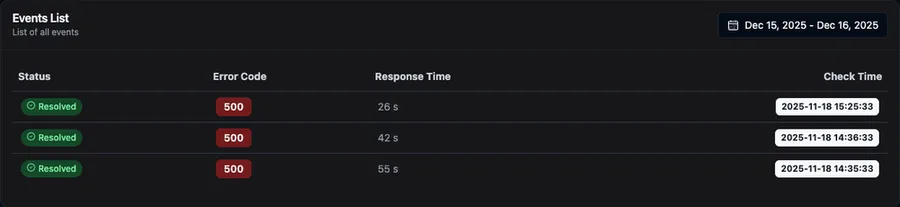
Watchman Tower continuously checks whether the WordPress site is reachable. When a check fails, the platform can detect the incident, record the error condition, and confirm when the site recovers.
This outside-in approach helps identify customer-facing problems regardless of whether the WordPress administration panel is accessible.
Response Time and Regional Performance
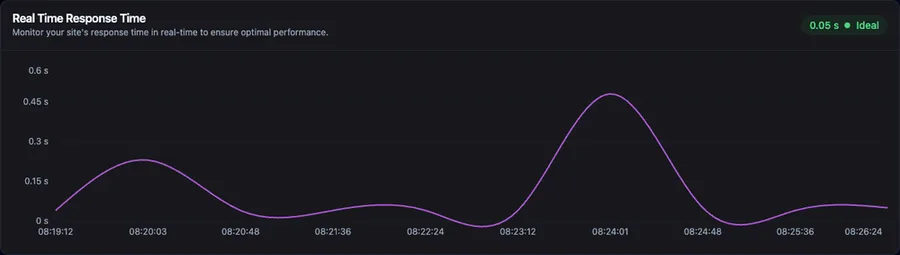
A WordPress site can remain online while becoming slow enough to affect visitors, conversions, or administrative work.
Response time monitoring helps you identify spikes, persistent slowdowns, and regional performance differences. Watchman Tower can separate parts of the request lifecycle, including DNS, connection, TLS, and time to first byte, so you have more context than a single average response-time number.
SSL Certificate Monitoring
An expired or invalid SSL certificate can prevent visitors from trusting or accessing a WordPress site.
Watchman Tower monitors certificate status independently from WordPress and provides visibility before expiry becomes an urgent operational problem.
Domain Expiry Tracking
A healthy WordPress installation is still unreachable when its domain registration expires.
Domain expiry monitoring keeps renewal dates visible and helps teams avoid preventable outages caused by missed registrar emails, unclear ownership, or outdated payment methods.
Internal WordPress Health with the Official Plugin
External monitoring tells you what visitors experience. The official Watchman Tower WordPress plugin adds internal information that can help explain why the site is becoming unstable, outdated, or difficult to maintain.
The plugin is an integration layer between the WordPress installation and the Watchman Tower platform. It does not replace external monitoring, and it is not required for uptime checks.
Once connected, the plugin sends lightweight WordPress health snapshots to the monitoring dashboard.
WordPress and PHP Environment
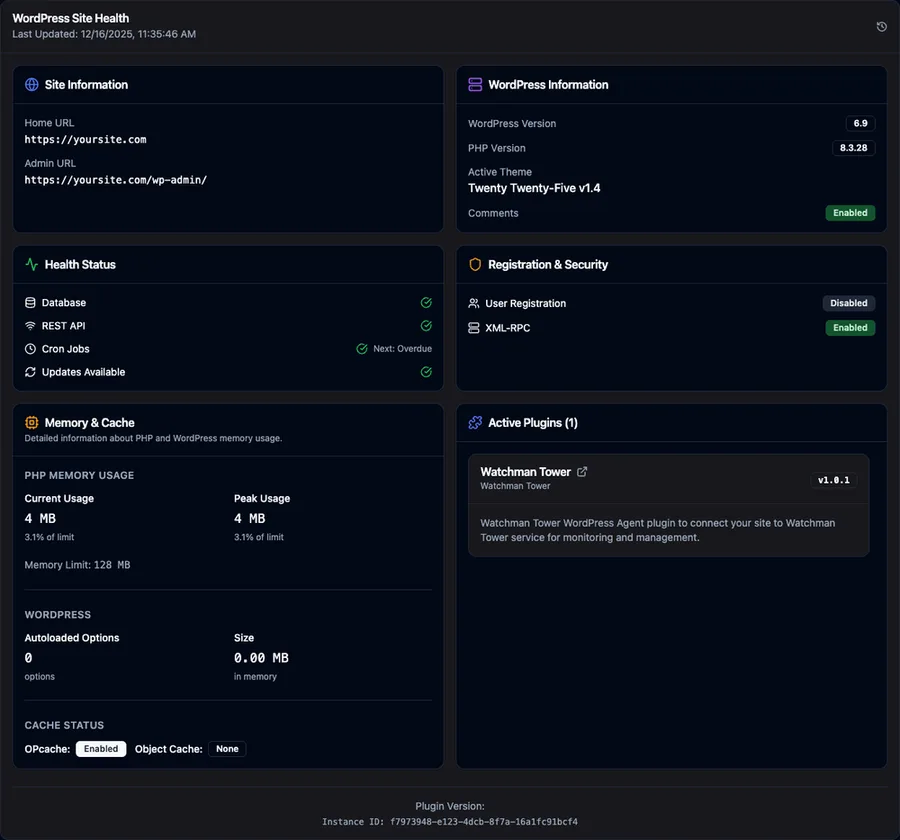
Review the WordPress version, PHP version, active theme, installed plugin versions, site URLs, and other environment details from the Watchman Tower dashboard.
This creates a centralized inventory that is particularly useful when you manage sites with different hosting environments or maintenance schedules.
Core, Plugin, and Theme Update Visibility
Pending updates can introduce operational and security risk, especially when dozens of WordPress installations are managed separately.
Watchman Tower shows pending WordPress core, plugin, and theme update information. Core and plugin update conditions can also generate WordPress-specific alerts, while the broader update status remains available as maintenance context.
Database and Cron Visibility
The plugin reports WordPress database health and cron information, including overdue events and upcoming scheduled tasks.
Database failures can generate alerts. Cron information is currently presented as diagnostic visibility, helping teams investigate background-task problems without claiming that every overdue event automatically creates an incident.
PHP Memory and Autoload Size
WordPress performance problems are often connected to application-level pressure that an external uptime check cannot explain.
The plugin reports PHP memory usage and configured limits. Watchman Tower can generate warnings when memory usage approaches defined thresholds and record recovery when usage returns to an acceptable level.
Autoload size is also shown as diagnostic context. A large autoloaded options dataset can increase the work WordPress performs on many requests, making it a useful signal when investigating slow or unstable sites.
Active Plugin Inventory
Review active plugins and their installed versions from the monitoring dashboard.
This is a current inventory rather than a complete plugin change-history system, but it gives teams useful environmental context when diagnosing an incident or planning maintenance.
Registration and XML-RPC Status
Watchman Tower surfaces whether public user registration and XML-RPC are enabled.
These are configuration visibility signals rather than a complete WordPress security monitoring or change-detection system. They help teams review potentially relevant settings alongside other WordPress health data.
Turn WordPress Signals into Actionable Context
Collecting more metrics is not useful unless the information helps a team recognize risk or investigate an incident.
Watchman Tower stores WordPress health snapshots alongside external monitoring data. Supported conditions can create WordPress-specific alerts, while other signals remain available as diagnostic context in the dashboard.
Current WordPress alert conditions include:
- WordPress core updates become available
- Plugin updates require attention
- The WordPress database health check fails
- PHP memory usage approaches or exceeds configured thresholds
Cron status, theme update counts, autoload size, active plugins, PHP and WordPress versions, and other environment details provide additional context during maintenance and incident investigation.
Understand Incidents Faster
An uptime alert tells you that a WordPress site cannot be reached. It does not always tell you what happened inside the application before the failure.
Combining external and internal monitoring can reduce that blind spot.
For example, an external incident may show that the site began returning server errors. The latest WordPress health snapshot may also show high PHP memory usage, pending updates, database problems, or an unusual environment state.
These signals do not automatically prove the root cause, but they give the person investigating the incident a stronger starting point.
Learn more about this distinction in WordPress monitoring plugin.
Monitor Multiple WordPress Sites from One Dashboard
Managing one WordPress site is different from managing a portfolio.
Agencies, freelancers, developers, and multi-site operators need a consistent way to see which sites are unavailable, slow, approaching certificate or domain expiry, or reporting internal WordPress health problems.
Watchman Tower centralizes external monitoring, WordPress health information, alert history, incidents, and operational status across multiple sites.
Instead of opening every WordPress administration panel individually, teams can use one monitoring workflow to identify which sites need attention first.
See how the workflow is designed for service teams in WordPress Monitoring for Agencies.
Alerts, Incidents, and Mobile Visibility
Watchman Tower can deliver monitoring and incident notifications through the channels your team already uses, including email, Slack, SMS, and push notifications.
Recovery notifications help confirm when an externally detected problem has cleared, while the dashboard preserves monitoring history and WordPress-specific context for later review.
Explore notification options and use the Watchman Tower mobile app for push-based monitoring visibility.
How the WordPress Plugin Works
The official plugin creates a secure connection between a WordPress installation and its corresponding site in Watchman Tower.
- Add the WordPress site to Watchman Tower.
- Install the official Watchman Tower plugin from WordPress.org.
- Generate a short-lived registration token from the Watchman Tower dashboard.
- Paste the token into the plugin to verify and connect the site.
- Watchman Tower begins requesting authenticated WordPress health snapshots.
- Review external monitoring and internal WordPress information from the same site dashboard.
After registration, communication uses an authenticated agent connection. The plugin can also be disconnected from WordPress when the integration is no longer required.
Review the complete process in the WordPress integration documentation.
You can install the integration from the official Watchman Tower plugin page on WordPress.org.
Start with External Monitoring, Add Internal Context When Needed
You do not need to install the plugin before monitoring a WordPress site.
Start by adding the site URL and enabling external checks for uptime, response time, SSL, and domain expiry. This immediately gives you an independent view of the site’s customer-facing availability.
Connect the official plugin when you also need WordPress-specific health information, update visibility, memory data, cron context, plugin inventory, and environment details.
This gradual setup keeps monitoring flexible: external checks provide the operational baseline, while the plugin adds deeper application context.
Learn More About WordPress Monitoring
Check your website's health in seconds
Uptime · Response time · SSL · Domain expiry · WordPress detection
Free plan available. No credit card needed.