

Uptime Monitoring Alerts & Escalation: How to Build Alerts Teams Won't Ignore
- Watchman Tower Team
- Updated: July 21, 2026
- Category: Website Monitoring
- Read Time: 5 min
Alerting and escalation only work when teams trust the signal. This guide explains how to build uptime alerts people act on instead of ignoring.
Uptime monitoring is only as useful as the alerts it produces. If alerts are noisy, vague, or sent through the wrong channels, teams stop trusting them. And once that happens, monitoring turns from protection into background noise.
The goal of alerting is not to generate more notifications. It is to generate the right notifications with enough confidence and context for someone to act. That is what separates a mature monitoring workflow from a simple uptime checker.
What Good Uptime Alerts Actually Do
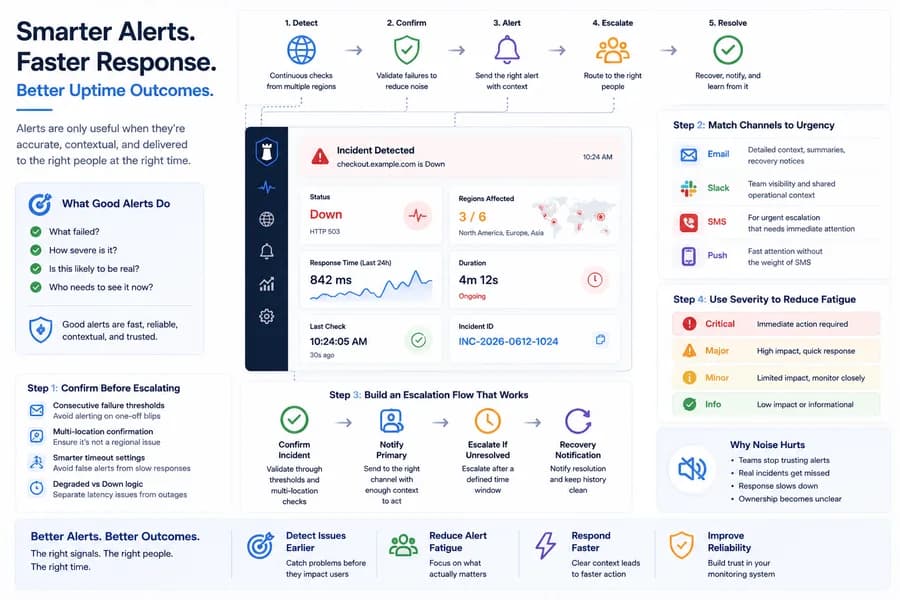
A good uptime alert should help a team make a decision quickly. It should answer a few basic questions right away:
- What failed?
- How severe is it?
- Is this likely to be real?
- Who needs to see it now?
That means good alerts are not only fast. They are also reliable, contextual, and calm enough to be trusted.
Why Alert Noise Becomes a Monitoring Problem
Noisy alerting causes more damage than most teams expect. Repeated false positives, weak severity rules, and low-confidence notifications slowly train teams to ignore the system.
Once trust drops, the real problem is no longer only downtime. It becomes delayed response, unclear ownership, and a monitoring setup that looks active but fails when it matters most.
Related reading: Uptime Monitoring Guide and Website Monitoring vs Uptime Monitoring.
Step 1: Confirm Incidents Before Escalating Them
One of the easiest ways to improve alert quality is to avoid treating every failed check as a confirmed incident. Basic uptime monitoring often becomes noisy when teams alert on the first failure without enough validation.
Better setups usually combine:
- Consecutive failure thresholds so one-off blips do not trigger a full incident.
- Multi-location confirmation so regional noise is less likely to look like a global outage.
- Smarter timeout settings so slow responses are not immediately labeled as downtime.
- Separate degraded vs down logic so latency problems and availability failures are not mixed together.
This is one of the clearest differences between a basic alerting setup and a more reliable monitoring workflow.
Step 2: Match Channels to Urgency
Not every issue deserves the same kind of interruption. The best alerting setups use different channels for different urgency levels.
Best for detailed incident context, recovery notices, summaries, and audit trails. Email should support incident understanding, not carry the full burden of urgent response.
Slack
Best for team visibility and shared operational context. Slack works well when alerts need to be visible to the people already working together.
SMS
Best for genuinely urgent escalation. SMS should be reserved for incidents where immediate human attention matters.
Push Notifications
Best for fast attention without the weight of SMS. Push can work well as a first-line signal for confirmed incidents.
The point is not to use every channel for every event. The point is to choose channels intentionally so teams get the right kind of interruption for the situation.
Step 3: Build an Escalation Flow That Survives Real Life
Escalation exists because people are busy, asleep, in meetings, offline, or no longer responsible for the service that failed. Good monitoring systems assume this and route incidents accordingly.
A simple escalation pattern usually looks like this:
- Confirm the incident through thresholds and validation.
- Notify the primary team channel with enough context to act.
- Escalate if unresolved after a defined time window.
- Send recovery notifications and keep incident history clean.
This keeps alerting operational rather than personal. Teams respond faster when ownership is shared and recovery is visible.
Step 4: Use Severity to Reduce Fatigue
If everything is urgent, nothing is urgent. Alert fatigue usually appears when severity is missing or too simplistic.
A practical severity model can separate:
- Critical incidents that need immediate action
- Major incidents that need team visibility and quick triage
- Minor or low-confidence issues that should be logged or routed more quietly
This helps teams spend attention where it matters most and avoids turning every signal into a high-stress interruption.
Step 5: Treat Alerts as Part of a Broader Monitoring Workflow
Reliable alerting does not live in isolation. It works better when teams can connect availability incidents to response behavior, broader website health, and operational context.
That is why more mature monitoring setups tend to combine:
- Uptime detection for availability failures
- Response time tracking for degradation before downtime
- Broader website health signals for issues that a single check will miss
- Incident history for learning and tuning thresholds over time
To go deeper on that broader picture, read Beyond Uptime and Essential Website Monitoring Metrics.
Recommended Alerting by Team Type
Solo Builder or Small Site
- Use 2 consecutive failures before alerting
- Send Email plus Push
- Keep escalation simple
Startup or SaaS Team
- Use multi-location or stronger confirmation where possible
- Route alerts to Slack plus Push
- Escalate urgent unresolved incidents after a defined window
Revenue-Critical Services
- Separate degraded vs down signals
- Use stronger confirmation and cleaner severity routing
- Reserve SMS for the incidents that truly justify it
How Watchman Tower Helps
Watchman Tower is designed to make uptime alerting more trustworthy, not just more active. That means teams can detect downtime earlier, track response behavior, reduce alert noise, and keep incident workflows clearer as monitoring needs grow.
- Uptime checks with response time visibility
- Incident history that helps teams understand what actually happened
- Alerting through channels people are likely to see
- A broader monitoring workflow that goes beyond a single up/down result
Explore the product side here: Uptime Monitoring.
Quick Checklist for Better Alerting
- Do not alert on every single failed check.
- Use confirmation logic before classifying an incident.
- Match channels to urgency instead of broadcasting everything everywhere.
- Separate down, degraded, and low-confidence issues.
- Review incident history and tune thresholds regularly.
Final Takeaway
The best uptime alerts are not the loudest ones. They are the ones teams trust. If your monitoring workflow reduces noise, improves confidence, and routes the right incidents to the right people, alerting becomes an operational advantage instead of a source of fatigue.
That is the difference between getting notifications and building a monitoring system people will actually rely on.
Free plan available. No credit card needed.
FAQ
What is uptime monitoring alert escalation?v
How do you avoid false positives in uptime alerts?v
Which alert channels should I use for uptime monitoring?v
Are push notifications useful for uptime alerts?v
How often should uptime monitoring alerts be sent?v
What is alert fatigue and how can it be prevented?v
What is the difference between alerts and notifications?v
Should uptime alerts be sent to individuals or teams?v
How quickly should an uptime incident be escalated?v
Can uptime monitoring alerts be customized per service?v
Blog Posts
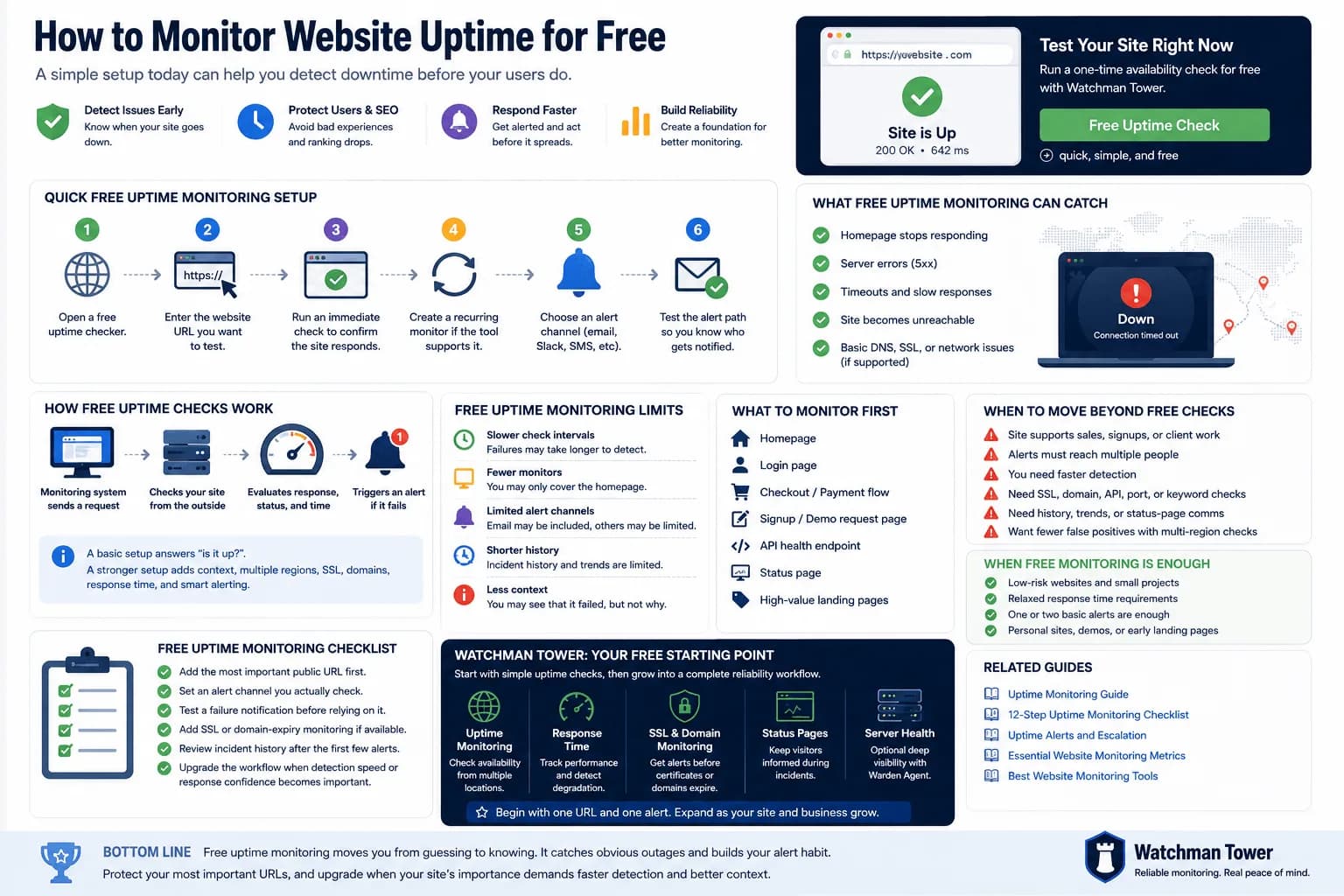
Monitor Website Uptime for Free: Setup, Limits, and Next Steps...
You can monitor website uptime for free by adding your URL to a basic checker, choosing an interval, and enabling alerts. This guide explains the fastest setup, what free checks can catch, and where free monitoring starts to fall short.
Learn more about Monitor Website Uptime for Free: Setup, Limits, and Next Steps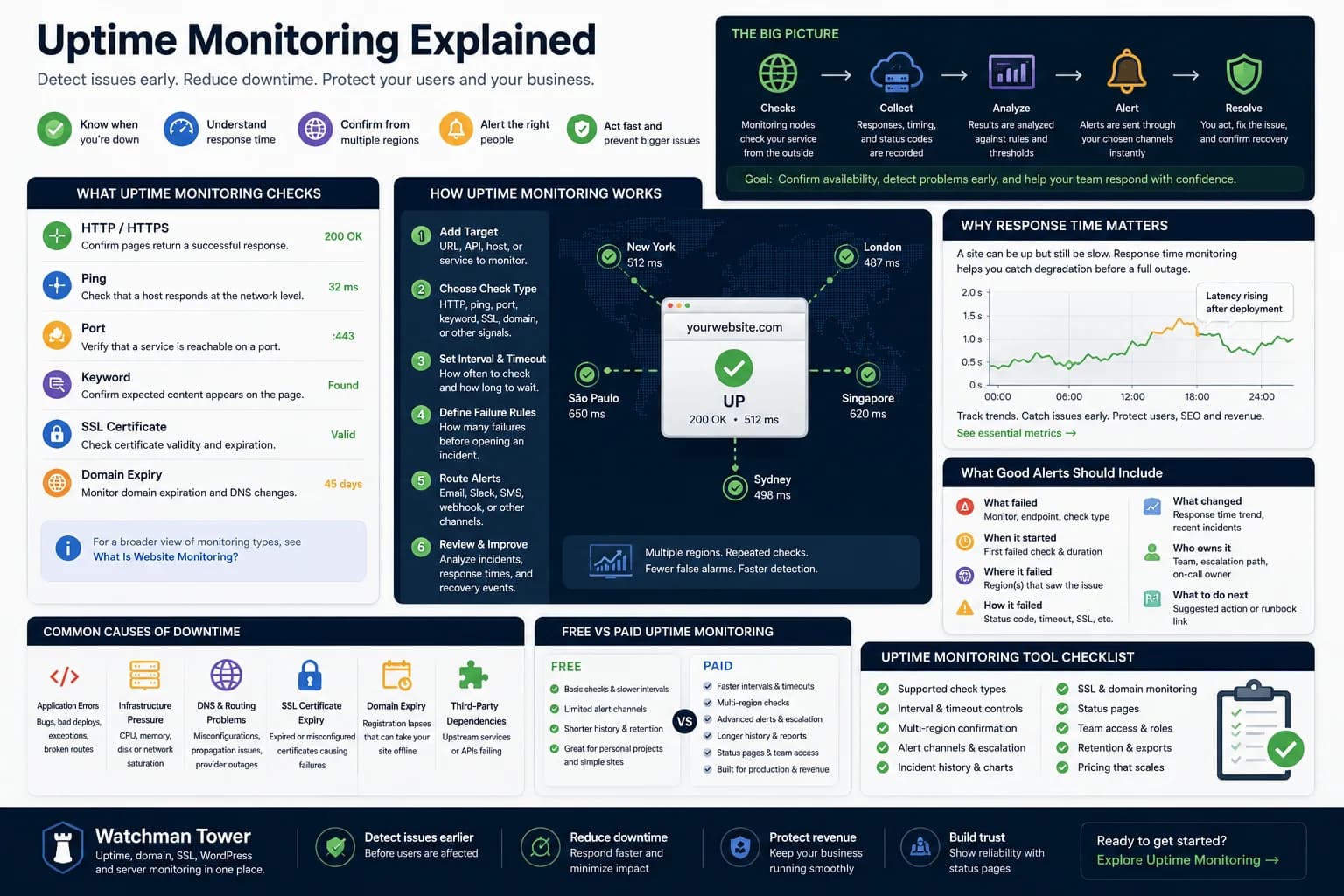
Uptime Monitoring Guide: How to Detect Downtime and Alert Faster...
Uptime monitoring helps you detect when a website, app, or service becomes unavailable. This guide explains how checks work, which signals matter, how alerts should be routed, and how to turn basic uptime checks into a practical response workflow.
Learn more about Uptime Monitoring Guide: How to Detect Downtime and Alert Faster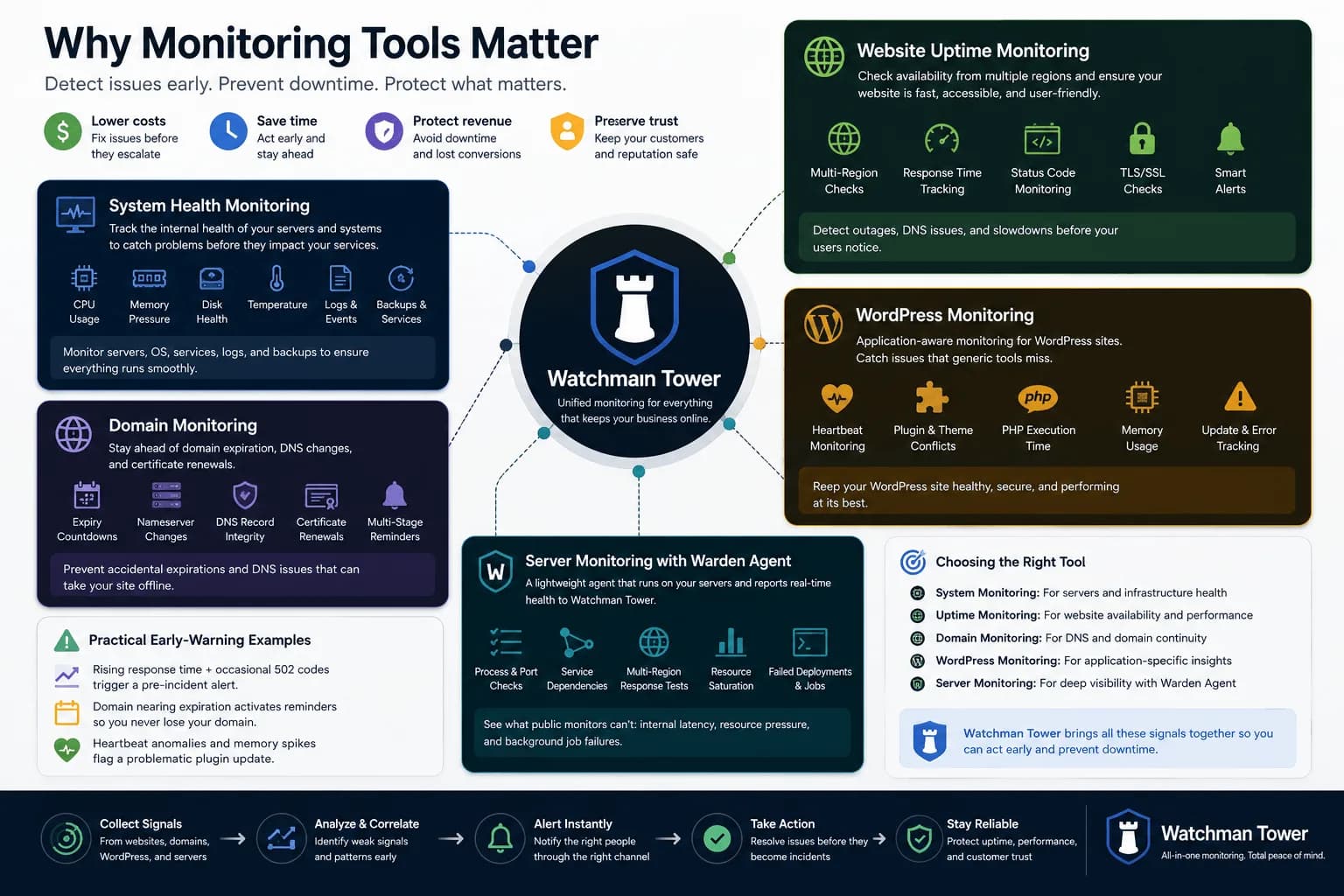
Different Types of Monitoring Tools: From System Health to Website Uptime...
Monitoring tools have expanded far beyond one-dimensional checks. This guide explains the main tool categories and where broader health visibility starts to matter.
Learn more about Different Types of Monitoring Tools: From System Health to Website Uptime