

WordPress Monitoring Tools: Complete Guide
- Watchman Tower Team
- Updated: August 10, 2026
- Category: WordPress Monitoring
- Read Time: 9 min
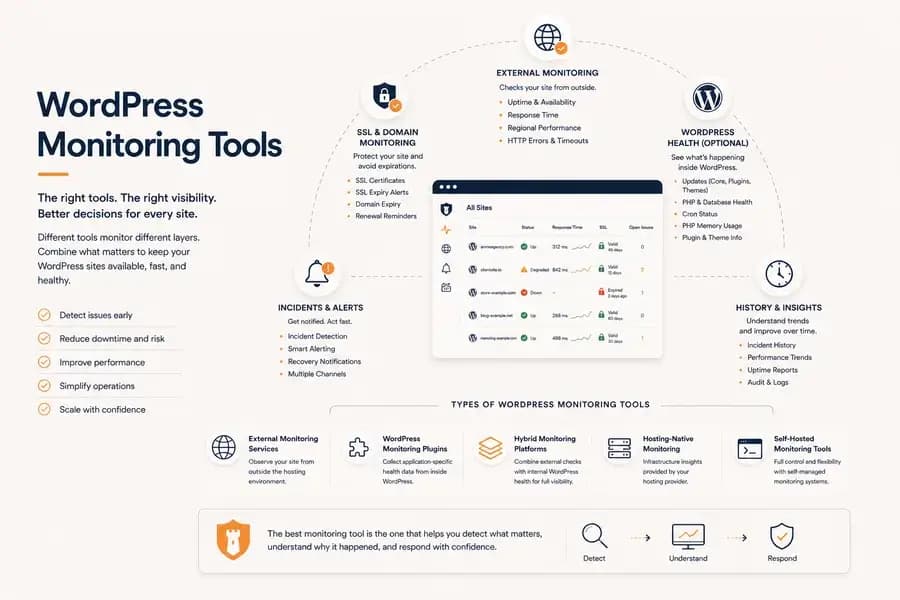
WordPress monitoring tools include external uptime monitoring, WordPress plugins, hybrid monitoring platforms, and hosting-native solutions. This guide explains how they differ, what they monitor, and how to choose the right monitoring workflow for your websites.
WordPress monitoring tools help site owners, developers, agencies, and operations teams understand whether a WordPress website is available, how it is performing, and what is happening inside the application.
The challenge is that not every monitoring tool observes the same part of the system.
Some tools check the public website from outside the hosting environment. Others run as WordPress plugins and report application-specific health information. Hosting providers may offer their own infrastructure dashboards, while hybrid monitoring platforms combine several monitoring layers in one workflow.
Choosing the right WordPress monitoring tool therefore depends on more than comparing feature lists. You need to understand what each tool can observe, what it may miss, and which operational decisions it can help your team make.
What Are WordPress Monitoring Tools?
WordPress monitoring tools are systems used to observe the availability, performance, dependencies, and internal health of WordPress websites.
A complete monitoring setup may cover:
- Public website uptime
- HTTP errors and connection failures
- Response time and regional latency
- SSL certificate status
- Domain expiry
- Incident detection and recovery
- WordPress core, plugin, and theme updates
- PHP and database health
- Cron activity
- Plugin and environment inventory
No single signal explains the complete state of a WordPress site.
A successful HTTP check proves that the site responded at that moment, but it does not prove that scheduled WordPress tasks are working correctly. A healthy plugin connection may provide detailed application data, but it does not prove that visitors can resolve the domain or complete an SSL connection.
Effective WordPress monitoring combines the signals required to observe both the public result and the application behind it.
The Main Types of WordPress Monitoring Tools
WordPress monitoring tools can be grouped according to where they observe the website and which failures they are designed to detect.
External Website Monitoring Services
External monitoring services send requests to the public WordPress website from outside its hosting environment.
Their main responsibility is to determine whether visitors and connected services can reach the site.
External monitoring can detect:
- Complete website downtime
- Failed HTTP responses
- Connection timeouts
- DNS resolution failures
- SSL certificate errors
- Slow public response times
- Regional availability problems
Because these checks operate independently from WordPress, they can continue detecting incidents when the application, PHP runtime, web server, or hosting environment is unavailable.
This makes external monitoring the foundation of a dependable WordPress uptime monitoring workflow.
WordPress Monitoring Plugins
A WordPress monitoring plugin runs inside the application and reports information that cannot normally be observed through an external HTTP request.
Depending on the plugin, this may include:
- WordPress and PHP versions
- Pending core, plugin, and theme updates
- Active plugins and installed versions
- PHP memory usage
- Database health
- Cron status
- Autoload size
- Application configuration details
Plugin-based information is useful for maintenance and diagnosis, especially across multiple WordPress installations.
However, the plugin runs inside the same application it observes. If WordPress or its hosting environment becomes completely unavailable, the plugin may be unable to report the failure.
A plugin should therefore add internal context rather than replace independent availability monitoring. Our guide to WordPress monitoring plugins explains these capabilities and limitations in more detail.
Hybrid WordPress Monitoring Platforms
Hybrid monitoring platforms combine external website checks with optional WordPress-specific health information.
This model creates two complementary monitoring layers:
- Outside-in monitoring shows whether the public website is reachable and how it is responding.
- Inside-out monitoring provides application-specific health and maintenance context.
A hybrid platform may detect a customer-facing outage externally while also preserving the latest WordPress health snapshot for investigation.
For example, external checks may show that a site began returning server errors while the latest internal data shows unusually high PHP memory usage or a database health problem.
The internal signal does not automatically prove the root cause, but it gives the person investigating the incident a more useful starting point.
This is why comparing WordPress monitoring plugins with external monitoring as competing alternatives is often misleading. The strongest setup usually allows both approaches to work together.
Hosting-Native Monitoring
Many hosting providers include monitoring dashboards for the WordPress sites running on their infrastructure.
These tools may provide:
- Server resource usage
- Hosting-level availability
- Traffic information
- PHP or database logs
- Backup status
- Platform-specific performance data
Hosting-native monitoring can be valuable, but it is usually limited to that provider’s environment.
This becomes a problem for agencies and teams managing WordPress websites across several hosting companies. Each provider may use different metrics, alerting rules, retention periods, and dashboards.
Independent monitoring creates a consistent operational layer across every site, regardless of where it is hosted.
Self-Hosted Monitoring Tools
Technical teams may choose to deploy and maintain their own monitoring systems.
Self-hosted tools can provide flexibility and control over infrastructure, configuration, data retention, and integrations.
The trade-off is operational responsibility. The team must maintain the monitoring infrastructure, secure it, keep it available, configure alert delivery, and verify that the monitoring system itself remains trustworthy.
Self-hosting may be appropriate for teams with specific compliance, integration, or data-control requirements. For many agencies and smaller development teams, a managed monitoring service reduces the maintenance burden.
What Should a WordPress Monitoring Tool Cover?
The right feature set depends on the importance and complexity of the websites being monitored. However, several monitoring capabilities form a useful baseline for most production WordPress sites.
Independent Availability Monitoring
The tool should check the public website from outside WordPress and its hosting environment.
It should detect more than a missing response. Useful failure information includes:
- HTTP status codes
- Timeouts
- Connection errors
- DNS failures
- SSL problems
- Regional check results
Independent monitoring is particularly important because the WordPress application cannot be expected to report reliably while it is completely unavailable.
Incident Confirmation and Recovery
A single failed request should not always create an incident.
Temporary packet loss, short deployment interruptions, and regional network problems can produce isolated failures that recover almost immediately.
A reliable monitoring tool should distinguish between:
- An isolated failed check
- A confirmed outage
- A degraded but reachable site
- A regional problem
- A recovered incident
Confirmation logic reduces false alarms and helps teams trust the notifications they receive.
Response Time Monitoring
WordPress sites can remain online while becoming slow enough to affect visitors, conversions, administrative work, and connected services.
A monitoring tool should reveal:
- Response-time trends
- Sudden latency spikes
- Recurring slow periods
- Regional performance differences
- Degradation before an outage
Response time is not the same as complete page-load performance, but it provides an important operational view of how quickly the server begins responding.
SSL Certificate and Domain Monitoring
A WordPress site may remain fully operational while users are unable to access it because of an expired SSL certificate or an expired domain name.
These failures occur outside the WordPress application but have the same business impact as downtime. Customers cannot access the website, search engines may encounter errors, and connected services may stop working.
A capable WordPress monitoring tool should therefore include:
- SSL certificate validity
- Certificate expiry reminders
- Domain expiry monitoring
- Early renewal notifications
Monitoring these dependencies alongside uptime creates a more complete operational picture instead of treating them as separate administrative tasks.
WordPress Health Monitoring
External monitoring tells you whether a site is available. WordPress health monitoring explains what is happening inside the application.
Useful internal signals include:
- WordPress and PHP versions
- Pending core, plugin, and theme updates
- Active plugins and themes
- Database health
- PHP memory usage
- Cron status
- Application configuration details
These signals improve maintenance planning and provide valuable diagnostic context during incidents, but they should complement—not replace—independent uptime monitoring.
Learn more in our guide to WordPress Monitoring Plugins.
How to Evaluate WordPress Monitoring Tools
Comparing WordPress monitoring tools becomes much easier when every product is evaluated against the same operational criteria instead of the length of its feature list.
Independence
Can the monitoring system continue detecting incidents when WordPress itself cannot respond?
Independent external monitoring should always remain the foundation.
Signal Quality
Does the platform provide meaningful operational signals or simply collect large amounts of data?
Good monitoring reduces uncertainty instead of creating additional information to interpret.
Alert Quality
Useful alerts arrive quickly, contain enough context to act, and avoid unnecessary false positives through confirmation logic.
Diagnostic Context
Detecting an outage is only the first step.
The monitoring platform should also help answer why the incident happened by combining performance data, WordPress health information, SSL status, and historical events.
Scalability
Monitoring one site and monitoring one hundred sites are different operational problems.
A good platform should remain manageable as the number of websites grows.
Ease of Onboarding
New sites should be added quickly without introducing unnecessary operational complexity.
Consistent onboarding leads to more consistent monitoring across the entire portfolio.
Which WordPress Monitoring Tool Is Right for You?
Single Website Owners
Independent uptime monitoring, SSL monitoring, and response-time tracking usually provide the strongest operational value. Internal WordPress health information becomes useful as maintenance requirements increase.
Freelancers and Developers
Developers often benefit from combining external monitoring with WordPress-specific health information, making it easier to diagnose incidents without opening every WordPress dashboard individually.
Agencies Managing Client Websites
Agencies should prioritize centralized visibility across multiple independent WordPress installations.
One dashboard, consistent alerting, shared workflows, and standardized monitoring reduce operational overhead as the client portfolio grows.
If this matches your workflow, our WordPress Monitoring for Agencies page explores the operational model in more detail.
Large Multi-Site Portfolios
Organizations responsible for many independent WordPress websites need more than individual uptime checks.
They require portfolio-level visibility into incidents, SSL certificates, domain renewals, response times, and optional WordPress health information.
Our WordPress Multi-Site Monitoring guide explains this workflow in detail.
How Watchman Tower Fits
Watchman Tower follows a hybrid monitoring model.
Every monitored site begins with independent external monitoring for uptime, response time, SSL certificates, and domain expiry.
Teams that require additional operational context can connect the official WordPress plugin to add WordPress-specific health information without replacing the external monitoring layer.
This approach allows availability to be verified independently while giving developers and agencies the application-level visibility needed for faster diagnosis and maintenance.
If you want to see how the platform combines these monitoring layers, visit the WordPress Monitoring feature page.
Choosing the Right WordPress Monitoring Tool
There is no universally "best" WordPress monitoring tool.
The right choice depends on what you manage, how quickly you need to respond to incidents, and how much operational visibility your team requires.
Start with independent external monitoring. Add WordPress-specific health information when it improves maintenance and troubleshooting. Keep monitoring consistent across every website you manage.
A monitoring tool should not simply tell you that something is wrong. It should help you understand what happened, prioritize your response, and restore service with confidence.
Free plan available. No credit card needed.
FAQ
What are WordPress monitoring tools?v
What are the main types of WordPress monitoring tools?v
Why is independent availability monitoring important for WordPress sites?v
What features should a WordPress monitoring tool cover?v
How do I choose the right WordPress monitoring tool?v
Blog Posts
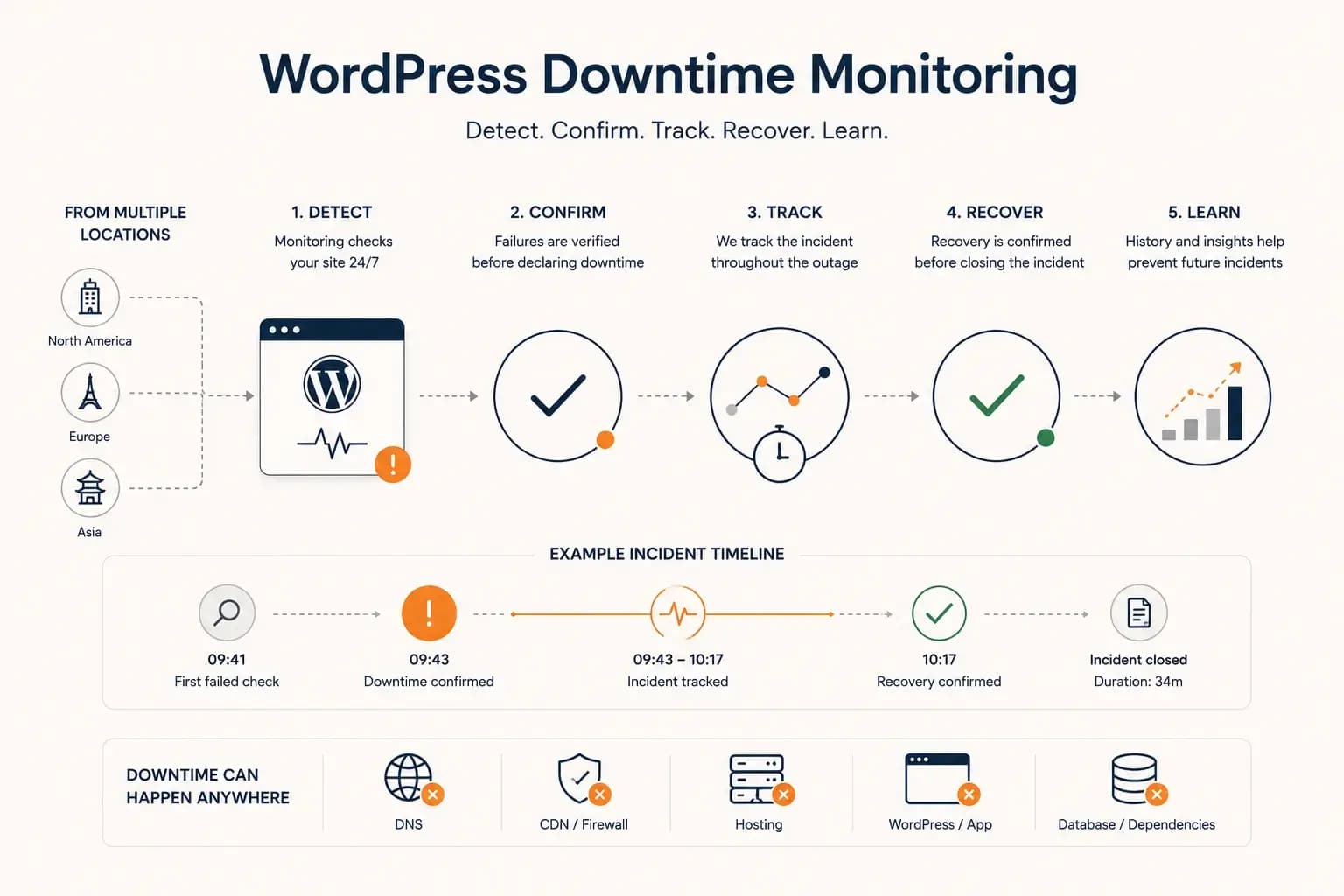
WordPress Downtime Monitoring: How to Detect and Track Outages...
WordPress downtime monitoring goes beyond detecting a failed request. Learn how to confirm real outages, track incidents, verify recovery, and use downtime history to improve reliability.
Learn more about WordPress Downtime Monitoring: How to Detect and Track Outages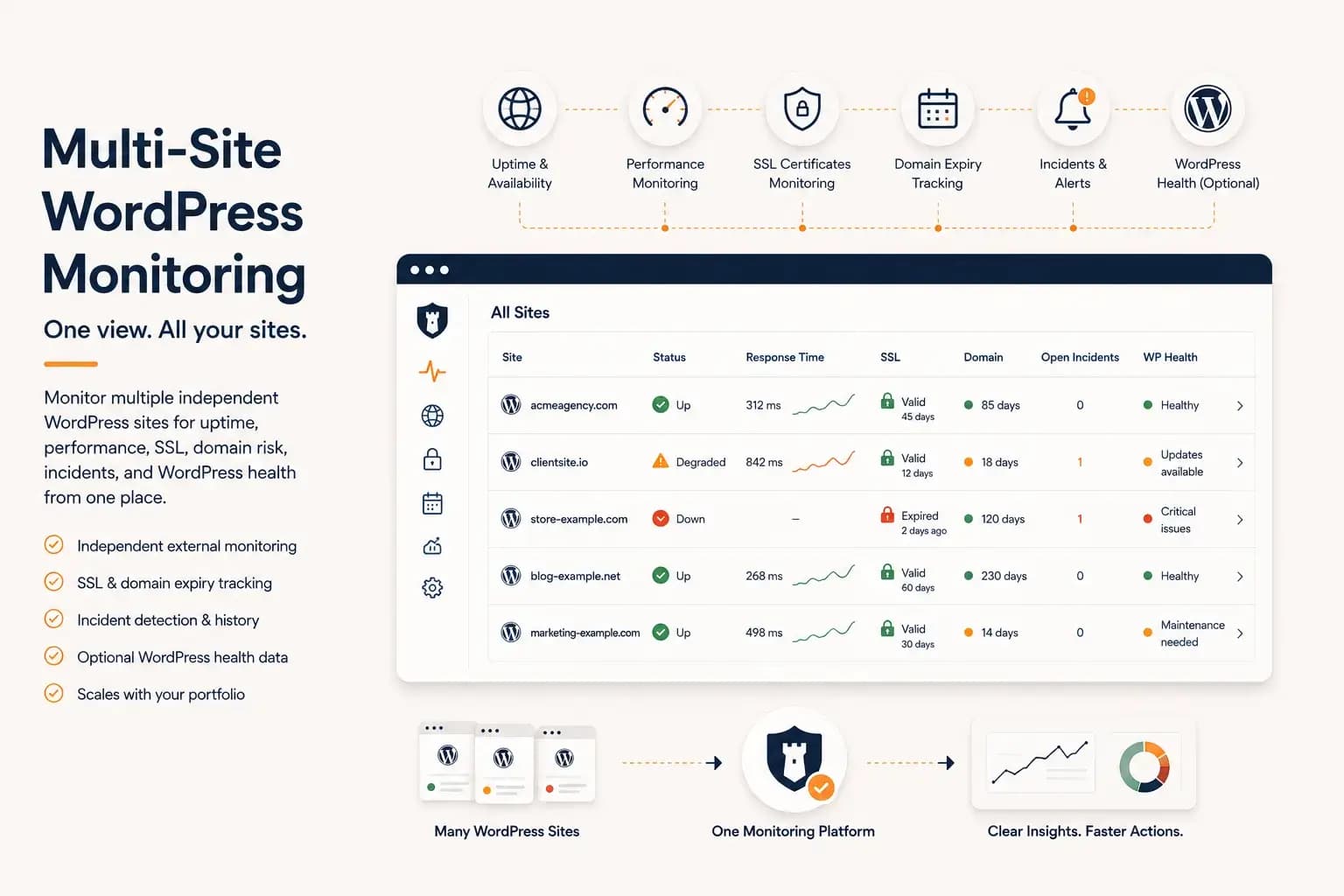
WordPress Multi-Site Monitoring: Manage Multiple Sites Efficiently...
Managing multiple WordPress websites requires more than uptime checks. Learn how to centralize monitoring, reduce operational overhead, and gain visibility into performance, SSL, domains, and WordPress health from a single dashboard.
Learn more about WordPress Multi-Site Monitoring: Manage Multiple Sites Efficiently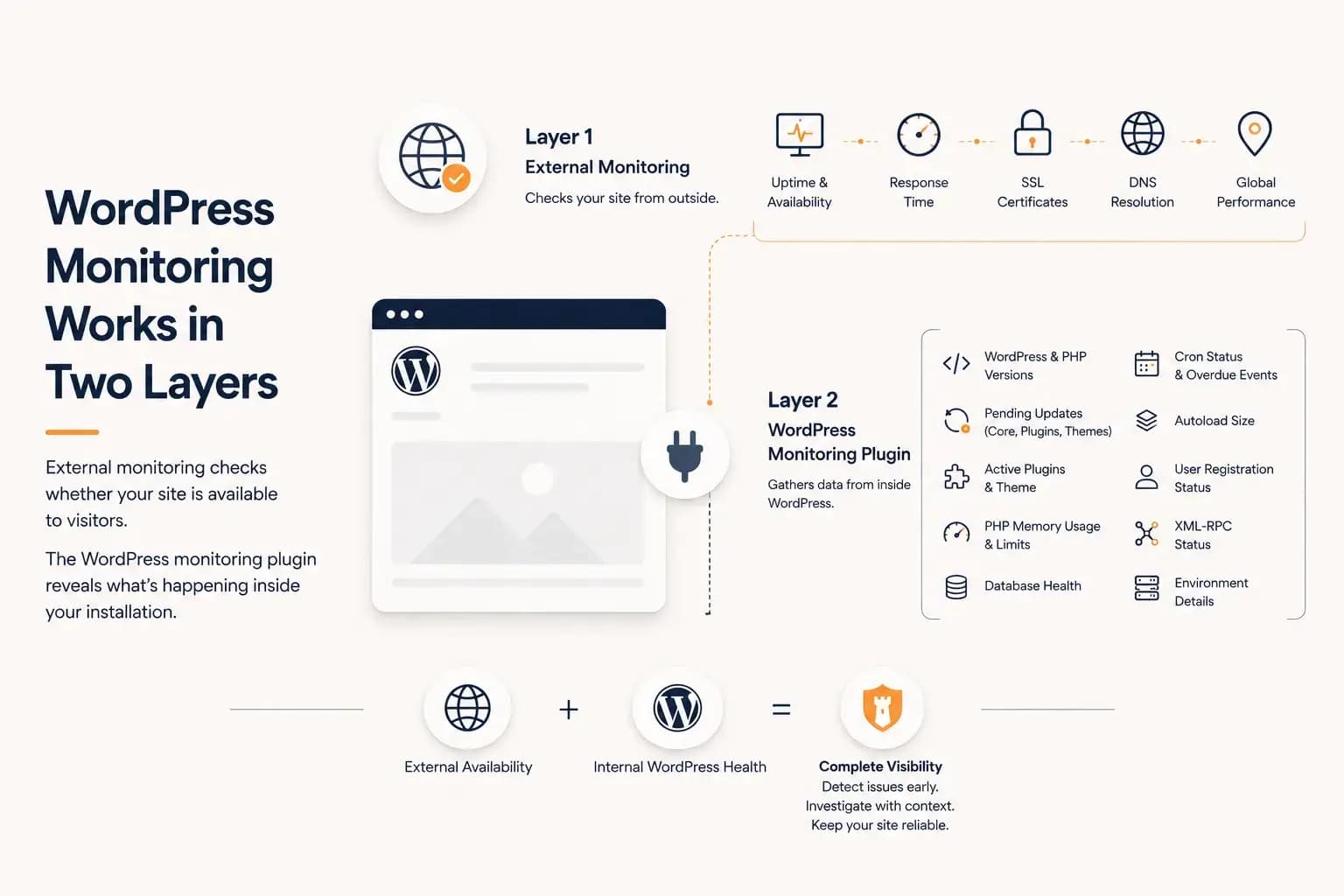
WordPress Monitoring Plugin: What It Tracks and What It Misses...
A WordPress monitoring plugin reveals application-level health such as updates, PHP memory, database status, cron activity, and plugin inventory. This guide explains what it can monitor, what it cannot see, and why it works best alongside external monitoring.
Learn more about WordPress Monitoring Plugin: What It Tracks and What It Misses