

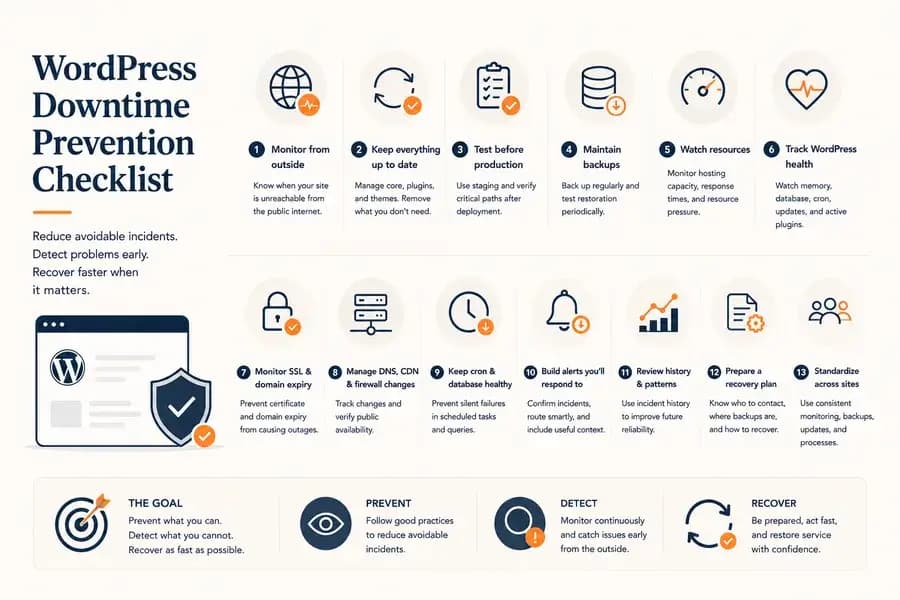
How to Prevent WordPress Downtime: A Practical Checklist
- Watchman Tower Team
- Updated: October 2, 2026
- Category: WordPress Monitoring
- Read Time: 8 min
Prevent WordPress downtime by reducing avoidable failures, detecting warning signs early, and preparing for faster recovery with this practical operational checklist.
Preventing WordPress downtime is not about eliminating every possible failure. No website can guarantee that.
The practical goal is to reduce avoidable incidents, detect warning signs early, limit the impact of failures, and make recovery faster when something still goes wrong.
That requires more than uptime monitoring alone. Hosting capacity, updates, backups, WordPress health, DNS, SSL, deployment practices, and incident response all contribute to availability.
Use this checklist as an operational baseline for keeping a WordPress site reliable.
1. Monitor the Website From Outside WordPress
Start with independent external monitoring.
External checks tell you whether visitors can actually reach the website, regardless of what WordPress or the hosting dashboard reports internally.
This helps detect failures involving:
- Web server or hosting outages
- HTTP 5xx errors
- Connection timeouts
- DNS resolution problems
- SSL connection failures
- Network or regional availability problems
External monitoring does not prevent the underlying failure, but it prevents an equally important operational problem: an outage continuing unnoticed.
The complete setup is covered in our WordPress downtime monitoring guide.
2. Keep WordPress Core, Plugins, and Themes Under Control
Updates are necessary, but unmanaged updates can create downtime just as easily as outdated software can.
A safer update process should include:
- Keeping WordPress core supported and reasonably current
- Reviewing pending plugin and theme updates
- Avoiding large batches of untested production changes
- Checking compatibility before major WordPress or PHP upgrades
- Removing abandoned or unnecessary plugins
The objective is not to install every update immediately. It is to avoid losing visibility into what is outdated, what changed, and which change introduced instability.
3. Test Risky Changes Before Production
Plugin updates, theme changes, PHP upgrades, caching configuration, and infrastructure changes can all affect WordPress availability.
Whenever the risk justifies it, test significant changes in a staging environment before applying them to the production site.
After deployment, verify the paths that matter rather than checking only the homepage.
Depending on the site, that may include:
- Login
- Checkout
- Forms
- Search
- API endpoints
- Important landing pages
A successful deployment is not proof that the website is functioning correctly for users.
4. Maintain Backups You Can Actually Restore
Backups do not prevent an outage from starting, but they can dramatically reduce its duration when recovery requires restoring data or application files.
A useful backup strategy should consider:
- Database backups
- WordPress files and uploads
- Backup frequency based on how often the site changes
- Storage outside the production server
- Retention of multiple recovery points
Most importantly, test restoration periodically.
A backup that has never been restored is an assumption, not a verified recovery plan.
5. Watch Hosting Capacity and Resource Pressure
WordPress often becomes unstable before it becomes completely unavailable.
Resource pressure can appear as:
- Increasing response times
- Intermittent 5xx errors
- Slow wp-admin requests
- Database connection problems
- PHP memory exhaustion
- Processes being terminated under load
Monitor the resources available at the hosting or server layer when possible, and combine that information with external response-time behaviour.
A site that is still technically online but becoming progressively slower may already be giving you the warning signs of a future incident.
For the performance side of this problem, see WordPress Performance Monitoring.
6. Pay Attention to WordPress Health Signals
External monitoring tells you what visitors experience. Internal WordPress health signals can reveal problems developing inside the application.
Useful operational context can include:
- PHP memory usage and limits
- Database health
- Cron status
- Pending WordPress, plugin, and theme updates
- WordPress and PHP versions
- Active plugin information
None of these signals alone proves that downtime is about to happen. They provide context that can reveal unhealthy conditions before or during an incident.
This is why internal signals work best alongside independent external monitoring rather than replacing it. See WordPress monitoring plugin for the architectural difference.
7. Monitor SSL and Domain Expiry
Not every WordPress outage originates inside WordPress.
An expired SSL certificate or domain registration can make an otherwise healthy website unavailable or unsafe for visitors.
These failures are particularly frustrating because they are usually preventable.
Keep visibility into:
- SSL certificate validity
- Certificate expiry dates
- Domain expiry dates
- Renewal responsibility
Treat these as availability dependencies rather than administrative paperwork.
8. Keep DNS, CDN, and Firewall Changes Visible
A healthy WordPress application can still become unreachable because of changes outside the application itself.
DNS records, CDN configuration, reverse proxies, and firewall rules all sit somewhere between the visitor and WordPress.
Changes in these systems can cause:
- DNS resolution failures
- Incorrect origin routing
- Redirect loops
- Monitoring requests being blocked
- Regional connectivity problems
- The website resolving to the wrong server
Treat infrastructure configuration changes with the same care as application deployments. Record significant changes and verify public availability after they are applied.
9. Do Not Ignore Cron and Database Health
Some WordPress failures develop quietly.
A broken cron system may not take the homepage offline immediately, but scheduled publishing, maintenance tasks, background processing, WooCommerce jobs, and plugin workflows can stop behaving correctly.
Database problems can follow a similar pattern. The site may remain partially functional while queries slow down, connections fail intermittently, or application errors begin appearing.
Keep these signals visible, especially on sites that depend heavily on scheduled tasks, ecommerce operations, memberships, or other background processing.
10. Build Alerts You Will Actually Respond To
Detection is useful only if the right person learns about the incident quickly enough to act.
Avoid alerting on every isolated failure. Instead, use confirmation logic to distinguish meaningful incidents from temporary network or application hiccups.
Your alerting workflow should:
- Confirm failures before declaring downtime
- Distinguish down from degraded states
- Route important incidents to appropriate channels
- Include enough context to begin investigation
- Confirm when the site has recovered
The goal is not maximum notification volume. It is an alerting system people still trust when a real incident happens.
See WordPress Uptime Monitoring and Alerting for the complete alerting workflow.
11. Keep Incident History and Look for Patterns
Preventing future downtime requires learning from previous incidents.
A single outage may look random. Several months of incident history can reveal recurring behaviour.
Look for patterns such as:
- Response times increasing before outages
- Repeated failures after deployments
- The same plugin or service appearing around multiple incidents
- Resource pressure during predictable traffic periods
- Regional or network-specific failures
- Recurring short incidents that were previously dismissed as noise
Incident history turns monitoring from a reactive alarm system into evidence that can improve future reliability decisions.
12. Prepare a Recovery Plan Before an Outage
Some downtime cannot be prevented.
A hosting provider can fail. A deployment can introduce an unexpected problem. A third-party dependency can disappear. Infrastructure can break despite reasonable precautions.
The next objective is therefore reducing recovery time.
Before an incident happens, know:
- Who is responsible for responding
- How to access the hosting or server environment
- Where backups are stored
- How to roll back a deployment
- Who controls DNS and the domain registration
- How critical third-party services are managed
- How clients or users should be informed during a longer incident
These details are easy to ignore while everything is working. During an outage, missing credentials, unclear ownership, or an untested restore procedure can extend downtime significantly.
13. Standardize the Process Across Multiple WordPress Sites
If you manage multiple WordPress sites, consistency becomes part of downtime prevention.
Avoid allowing every site to develop a completely different operational setup.
Standardize where practical:
- External uptime monitoring
- Notification channels
- Backup policies
- Update procedures
- SSL and domain tracking
- Incident ownership
- Recovery procedures
A consistent workflow makes it easier to understand what is protected, what is missing, and how the team should respond when any client site fails.
For portfolio-level monitoring, see WordPress Multi-Site Monitoring.
WordPress Downtime Prevention Checklist
Use this shorter checklist as a recurring operational review:
- Monitor the production site externally.
- Keep WordPress core, plugins, and themes under control.
- Test risky changes before deploying them to production.
- Maintain backups and periodically verify that they can be restored.
- Watch hosting capacity, response times, and resource pressure.
- Keep WordPress health signals such as memory, database, and cron status visible.
- Monitor SSL certificate and domain expiry dates.
- Track important DNS, CDN, and firewall changes.
- Use confirmed, actionable downtime alerts.
- Keep incident history and review recurring patterns.
- Maintain a documented recovery path.
- Test monitoring and notification workflows before a real incident occurs.
Where Watchman Tower Fits
Watchman Tower covers the monitoring and visibility layer of this process.
External monitoring provides independent availability and response-time information, while SSL and domain monitoring help surface infrastructure risks that can make an otherwise healthy WordPress site unreachable.
When the optional WordPress plugin is connected, internal health information adds application-specific context such as updates, memory usage, database health, cron status, and environment information.
Watchman Tower does not replace good hosting, backups, careful deployments, or recovery planning. It provides visibility across those operational layers so problems can be detected and investigated earlier.
The complete approach is available on the WordPress Monitoring page.
Prevent What You Can, Detect What You Cannot
No checklist can guarantee zero WordPress downtime.
A better reliability strategy is to prevent predictable failures, watch for unhealthy conditions, independently detect customer-facing outages, and prepare for fast recovery when prevention is not enough.
That changes the goal from an unrealistic promise of perfect uptime to something operationally useful: fewer avoidable incidents, earlier detection, and shorter recovery when failures still happen.
Free plan available. No credit card needed.
FAQ
Why is external monitoring critical for preventing WordPress downtime?v
How should I manage WordPress core, plugin, and theme updates to prevent downtime?v
What makes a backup strategy effective for minimizing WordPress downtime?v
What hosting resource warnings indicate potential WordPress downtime?v
How can I create actionable downtime alerts for WordPress?v
What essential elements should a WordPress downtime recovery plan include?v
Blog Posts
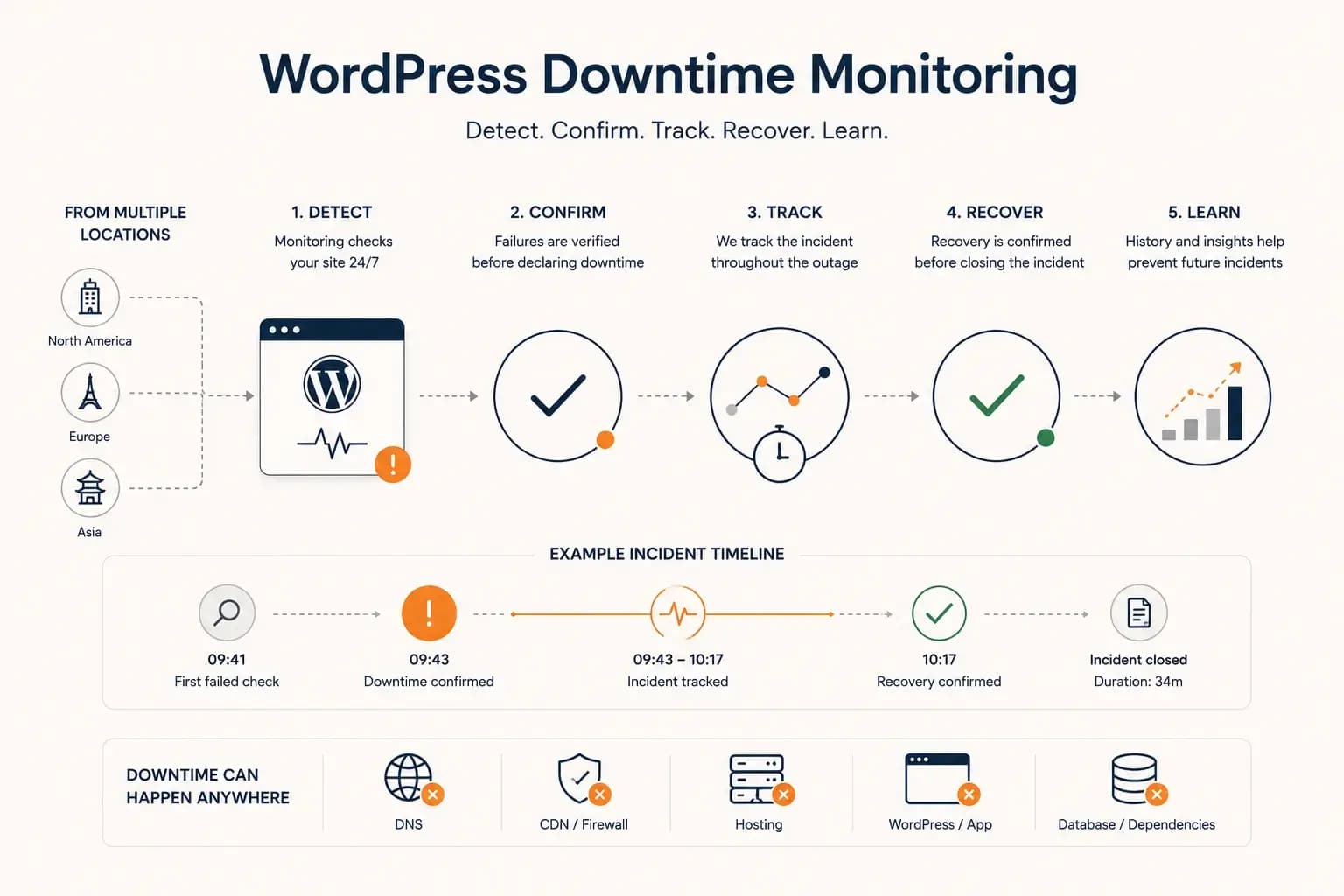
WordPress Downtime Monitoring: How to Detect and Track Outages...
WordPress downtime monitoring goes beyond detecting a failed request. Learn how to confirm real outages, track incidents, verify recovery, and use downtime history to improve reliability.
Learn more about WordPress Downtime Monitoring: How to Detect and Track Outages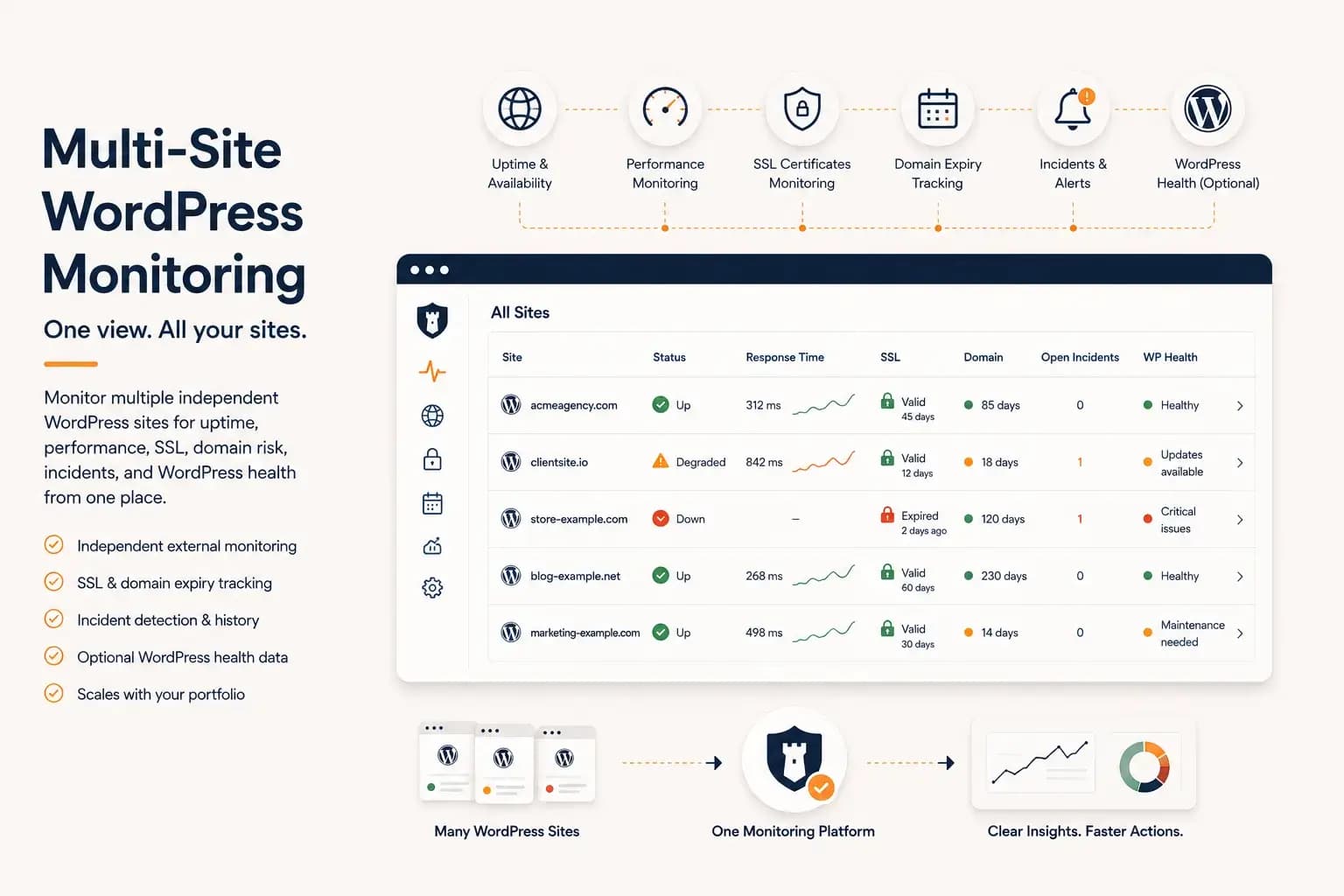
WordPress Multi-Site Monitoring: Manage Multiple Sites Efficiently...
Managing multiple WordPress websites requires more than uptime checks. Learn how to centralize monitoring, reduce operational overhead, and gain visibility into performance, SSL, domains, and WordPress health from a single dashboard.
Learn more about WordPress Multi-Site Monitoring: Manage Multiple Sites Efficiently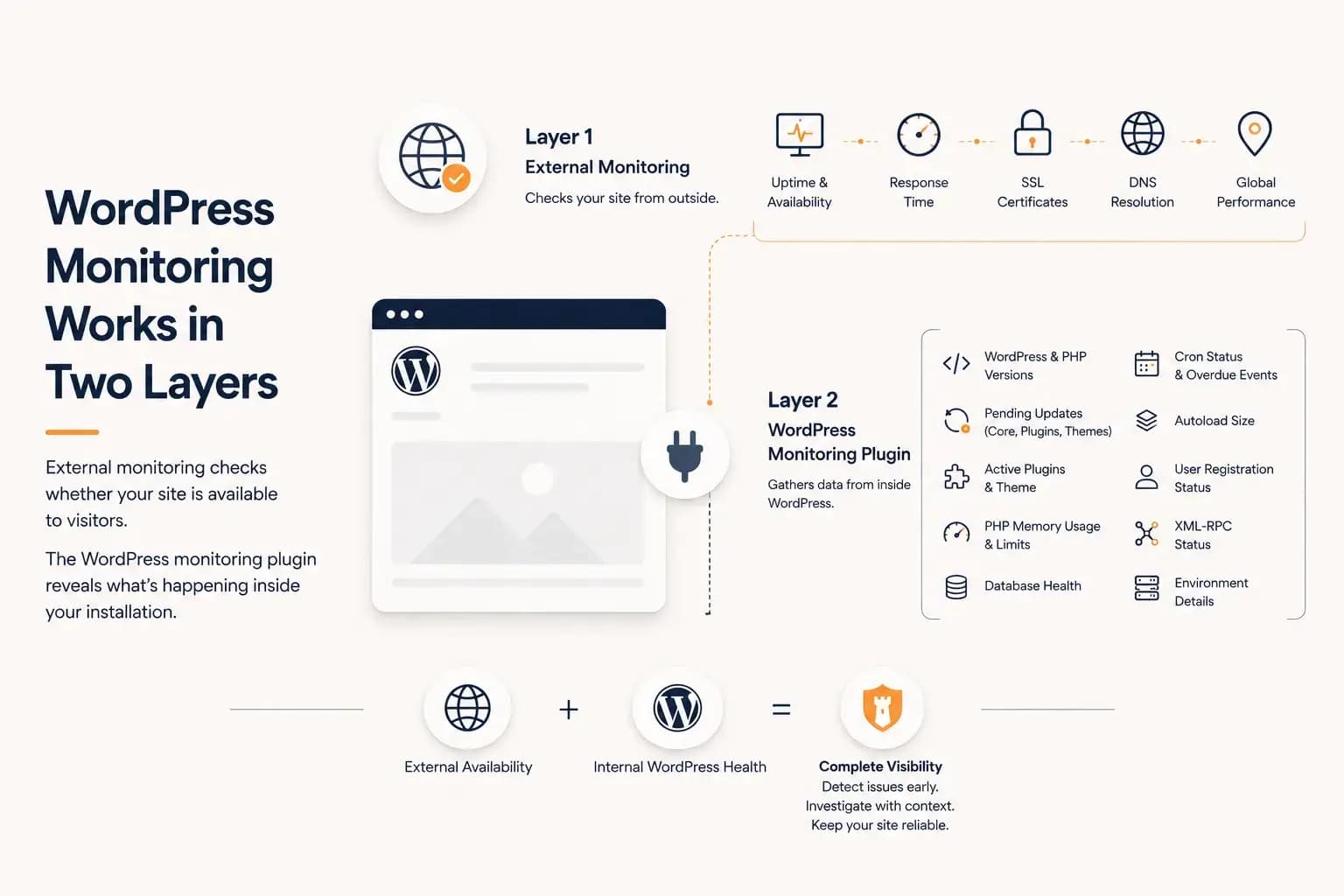
WordPress Monitoring Plugin: What It Tracks and What It Misses...
A WordPress monitoring plugin reveals application-level health such as updates, PHP memory, database status, cron activity, and plugin inventory. This guide explains what it can monitor, what it cannot see, and why it works best alongside external monitoring.
Learn more about WordPress Monitoring Plugin: What It Tracks and What It Misses