

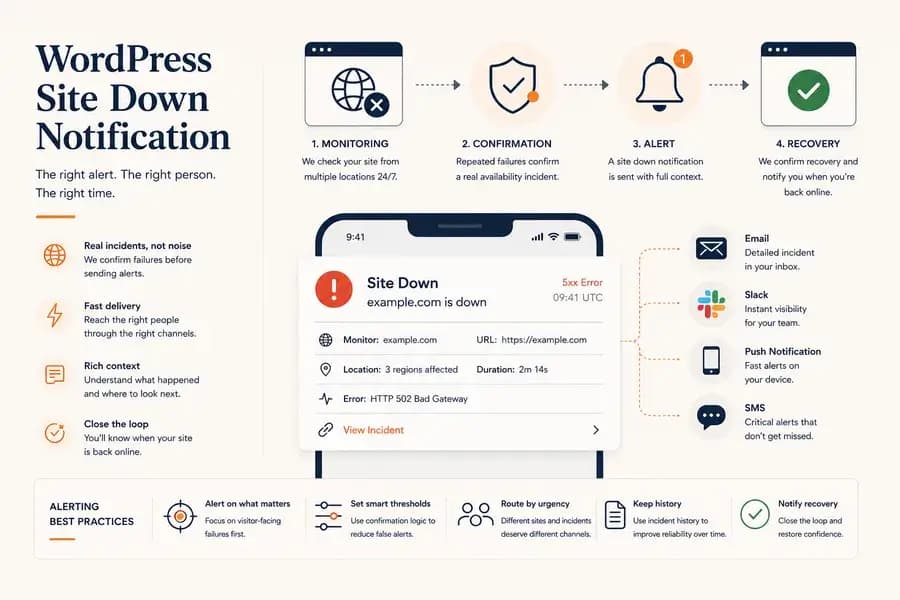
WordPress Site Down Notification: How to Get Instant Alerts
- Watchman Tower Team
- Updated: August 10, 2026
- Category: WordPress Monitoring
- Read Time: 8 min
WordPress site down notifications help teams react quickly when a real outage is confirmed. Learn how to choose channels, reduce noise, include useful context, and verify recovery.
A WordPress site down notification should tell you one thing quickly and clearly: a real availability incident has been confirmed and someone may need to act.
The notification itself is the delivery layer of the monitoring workflow. Uptime monitoring detects the problem, alerting logic decides whether it is meaningful, and the notification carries that incident to the right person through the right channel.
If you want the broader incident logic first, read WordPress Uptime Monitoring and Alerting. This guide focuses specifically on how site down notifications should work once an incident has been confirmed.
What Is a WordPress Site Down Notification?
A WordPress site down notification is a message sent after external monitoring confirms that a website is unavailable or repeatedly failing from the public internet.
Typical triggers include:
- Repeated HTTP 5xx responses
- Connection timeouts
- Refused connections
- DNS resolution failures
- SSL connection problems
- Confirmed multi-location availability failures
The important point is that the notification should represent a confirmed incident, not merely one failed request.
Why Fast Site Down Notifications Matter
The operational cost of downtime depends heavily on how long it takes someone to notice.
If the first alert comes from a customer, client, or colleague, the monitoring workflow has already failed at its most basic job.
Fast notifications are especially important for:
- WooCommerce stores losing active sales
- Lead-generation sites with unavailable forms
- Client websites managed under service expectations
- Campaign landing pages receiving paid traffic
- Membership or login-based applications
The goal is not to create panic after every short interruption. It is to shorten the gap between a confirmed customer-facing problem and the beginning of response.
Which Notification Channel Should You Use?
Different notification channels solve different operational problems.
Email is a useful baseline because it creates a persistent record and works well for general awareness.
It is less reliable as the only channel for urgent outages because important messages can be delayed, filtered, or simply missed in a busy inbox.
Push Notifications
Push notifications are useful when a person needs to know about an incident quickly without depending on email.
They work particularly well for solo operators, developers, and team members responsible for responding from a mobile device.
SMS
SMS is appropriate for incidents important enough to justify a direct interruption.
Because SMS is more intrusive and may have additional cost, it is usually best reserved for high-priority websites or confirmed critical outages.
Slack
Slack works well for teams because the notification becomes visible in a shared operational context.
Team members can see that an incident has already been detected, begin discussing it in the same environment, and reduce duplicate investigation.
Use More Than One Channel When the Risk Justifies It
Important websites should not necessarily depend on a single notification path.
For example, a team may use:
- Slack for shared visibility
- Push notifications for fast individual awareness
- SMS only for critical sites or severe incidents
- Email as the persistent baseline record
The best combination depends on how important the website is and who is responsible for responding.
Notification redundancy should improve reliability, not create duplicate noise. Sending every incident through every available channel usually makes the system harder to trust.
What Should a Site Down Notification Include?
A useful notification should be understandable without forcing the recipient to open several dashboards first.
At minimum, it should include:
- Site or monitor name
- Affected URL
- Incident state
- Detection time
- HTTP status, timeout, or connection error when available
- Monitoring location or locations involved
- A direct path to the incident details
The notification should answer the immediate questions: which site failed, what happened, and when did it start?
Recovery Notifications Close the Incident Loop
A down notification tells you when a problem begins. A recovery notification tells you when external monitoring has confirmed that the website is responding normally again.
This matters because manually refreshing the website is not a reliable way to close an incident.
A useful recovery notification should identify:
- The recovered site
- The incident that ended
- Recovery time
- Total incident duration
Recovery confirmation also creates a cleaner incident history for later investigation.
Why a WordPress Plugin Should Not Be Your Only Downtime Signal
A WordPress plugin can provide valuable application-level context, but it should not be responsible for proving whether the public website is reachable.
If the hosting environment is offline, PHP cannot execute, DNS stops resolving, or the SSL connection fails, a plugin running inside WordPress may be unable to report the problem.
External monitoring remains independent from the application and can continue checking the public website during those failures.
Plugin data is most useful as a second layer: it can provide WordPress-specific context around an incident without becoming the only source of availability detection.
The architectural difference is explained in WordPress Monitoring Plugin vs External Monitoring.
How to Set Up WordPress Site Down Notifications
A practical notification workflow starts with the monitoring configuration rather than the notification channel itself.
- Add the WordPress site to an external monitoring service. Use the public production URL that visitors actually access.
- Choose an appropriate check interval. More important sites may justify more frequent monitoring.
- Use incident confirmation. Avoid sending notifications immediately after every isolated failed request.
- Select the notification channels. Choose email, push, Slack, SMS, or a combination based on urgency and team structure.
- Confirm recovery notifications are enabled. The team should know when the website is healthy again.
- Test the workflow. Make sure notifications actually reach the people expected to respond.
The notification configuration should be tested before a real outage occurs. A channel that looks correctly configured but has never delivered a test notification is still an operational unknown.
Test Your Notification Workflow Before You Need It
Monitoring is most valuable when teams already know what an incident notification looks like and where it will arrive.
A basic test should confirm:
- The correct site name appears in the notification
- The expected recipient receives it
- The chosen channel delivers quickly enough
- The notification links to useful incident context
- Recovery is communicated separately
Testing is particularly important after changing team members, phone numbers, Slack workspaces, email addresses, or monitoring ownership.
Site Down Notifications for Agencies
Agencies face a different notification problem from single-site owners.
When dozens of client websites are monitored, sending every incident to every team member quickly becomes unmanageable.
A better workflow reflects the operational importance of each site.
For example:
- A high-revenue WooCommerce store may justify immediate push or SMS notification.
- A standard client brochure site may only require team visibility through Slack and email.
- Low-priority internal sites may not require an urgent mobile interruption at all.
The objective is to make important incidents difficult to miss without making routine events impossible to ignore.
Teams responsible for larger portfolios should also centralize their monitoring instead of configuring unrelated notification workflows for every hosting provider. Our WordPress Multi-Site Monitoring guide covers that portfolio-level approach.
What to Do When the Notification Arrives
The first response should be based on evidence rather than assumptions.
When a WordPress site down notification arrives:
- Open the incident details. Review the error type, status code, and timing.
- Check whether multiple monitoring locations failed. This helps distinguish a local network problem from a broader outage.
- Review recent response-time behaviour. A gradual slowdown may provide useful context.
- Check external dependencies. DNS, SSL, hosting, CDN, and routing failures can all make WordPress unreachable.
- Review WordPress health context when available. Internal plugin data may help narrow the investigation.
- Wait for independent recovery confirmation. Do not close the incident simply because one manual page refresh succeeds.
This response process connects the notification back to the broader uptime alerting workflow rather than treating it as an isolated message.
Common Site Down Notification Mistakes
Alerting After a Single Failed Request
One failed request can be transient. Without confirmation logic, teams receive unnecessary notifications and gradually stop trusting the system.
Relying Only on Email
Email works well as a baseline channel but may not provide enough urgency for business-critical outages.
Sending Everything Everywhere
Using email, Slack, SMS, and push for every minor incident creates redundancy without improving response quality.
Forgetting Recovery Notifications
Knowing that the site went down is only half of the operational timeline. Teams should also know when independent monitoring confirms that it has recovered.
Depending on WordPress to Report Its Own Outage
If WordPress is completely unavailable, the application cannot be trusted to send the alert that reports its own failure.
External monitoring avoids this circular dependency.
How Watchman Tower Handles Site Down Notifications
Watchman Tower monitors WordPress availability externally, so downtime detection does not depend on the WordPress application remaining healthy.
Confirmed monitoring events can be delivered through notification channels such as email, Slack, push notifications, and SMS, depending on the configured workflow.
Incident information remains connected to the monitored site, allowing responders to review the failure and recovery rather than receiving a notification with no operational context.
Teams that connect the optional WordPress plugin can also review application-specific health information alongside external availability data when investigating an incident.
See the complete monitoring model on the WordPress Monitoring feature page.
A Good Notification Should Start Action, Not Investigation from Zero
The purpose of a WordPress site down notification is not simply to say that something failed.
It should arrive after a meaningful incident has been confirmed, reach someone capable of responding, provide enough context to begin investigation, and close the loop when the website recovers.
When those pieces work together, the team spends less time discovering outages and more time resolving them.
Free plan available. No credit card needed.
FAQ
What is a WordPress site down notification?v
Why are fast site down notifications important?v
Which notification channels work best for downtime alerts?v
What should a site down notification include?v
Why shouldn't I rely solely on a WordPress plugin for downtime alerts?v
How do recovery notifications help?v
Blog Posts
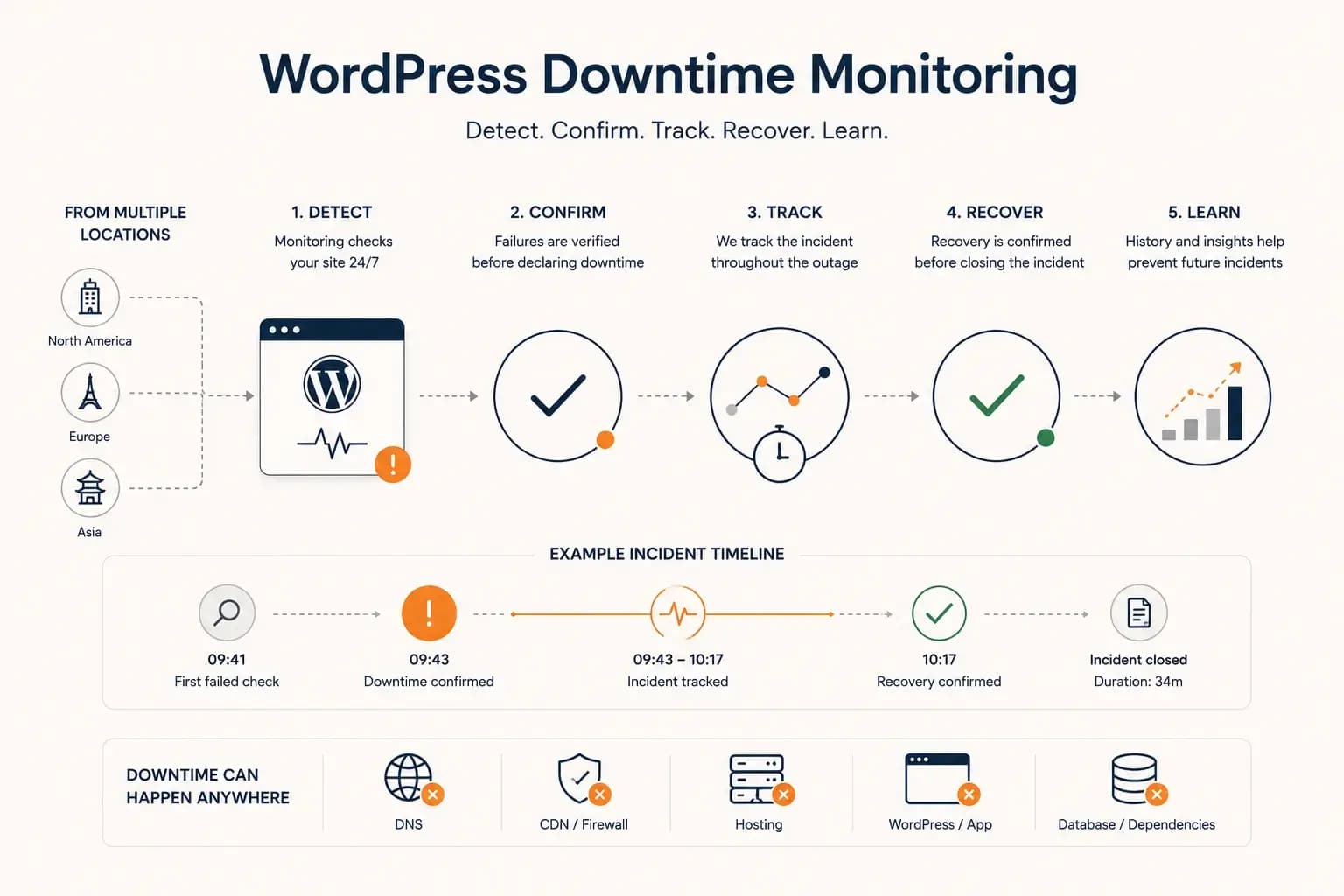
WordPress Downtime Monitoring: How to Detect and Track Outages...
WordPress downtime monitoring goes beyond detecting a failed request. Learn how to confirm real outages, track incidents, verify recovery, and use downtime history to improve reliability.
Learn more about WordPress Downtime Monitoring: How to Detect and Track Outages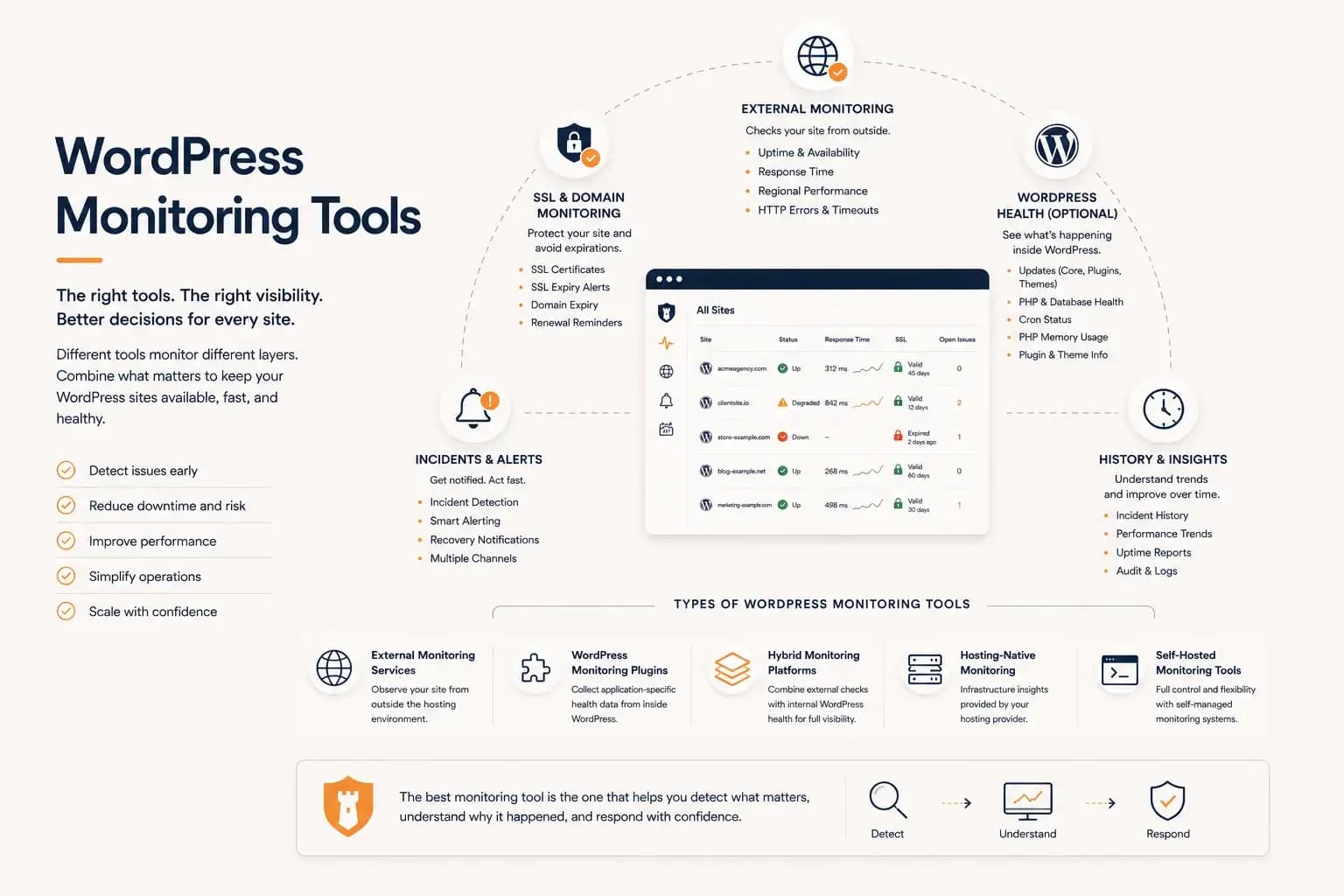
WordPress Monitoring Tools: Complete Guide...
WordPress monitoring tools include external uptime monitoring, WordPress plugins, hybrid monitoring platforms, and hosting-native solutions. This guide explains how they differ, what they monitor, and how to choose the right monitoring workflow for your websites.
Learn more about WordPress Monitoring Tools: Complete Guide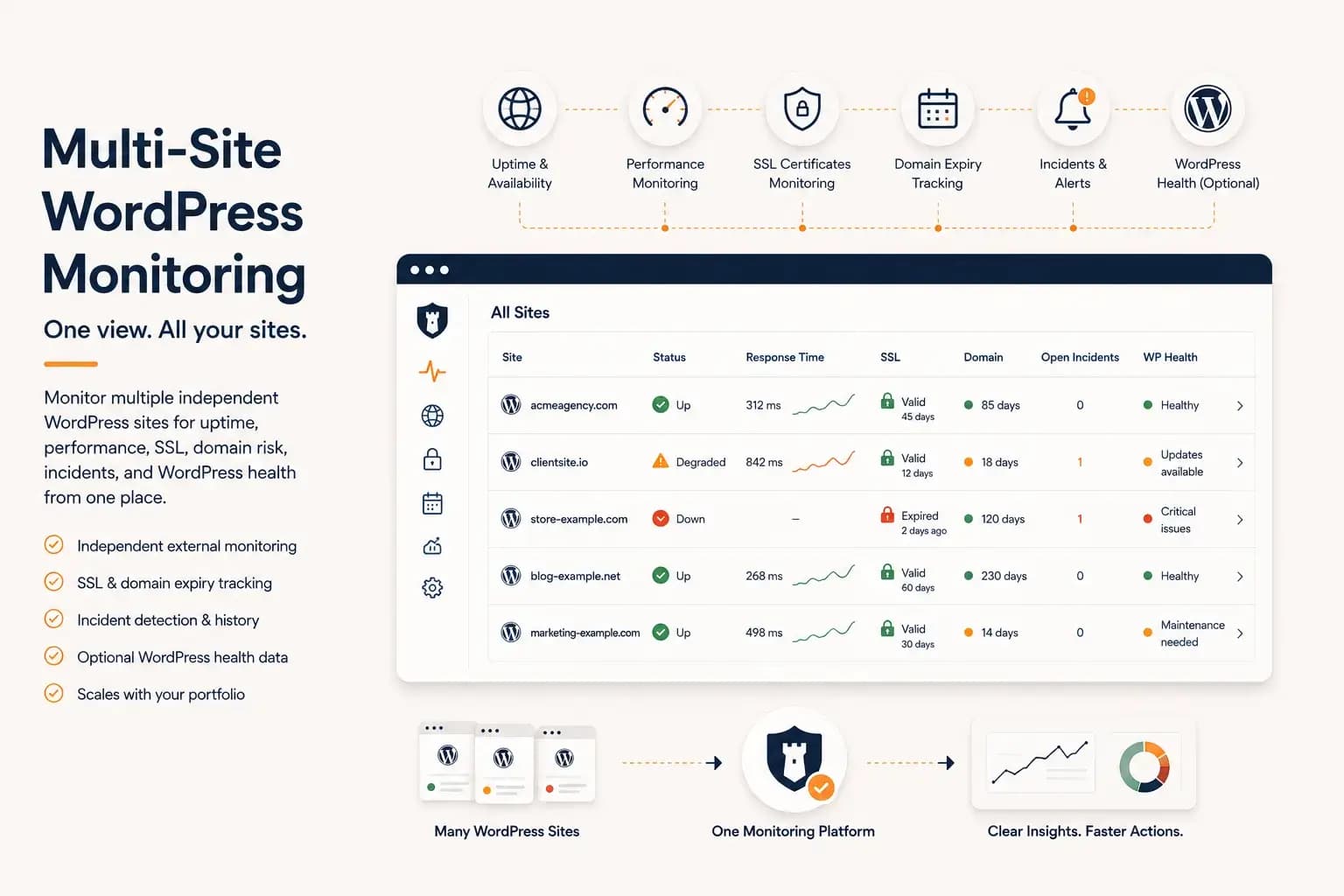
WordPress Multi-Site Monitoring: Manage Multiple Sites Efficiently...
Managing multiple WordPress websites requires more than uptime checks. Learn how to centralize monitoring, reduce operational overhead, and gain visibility into performance, SSL, domains, and WordPress health from a single dashboard.
Learn more about WordPress Multi-Site Monitoring: Manage Multiple Sites Efficiently