

Best WordPress Monitoring Service: What to Look For
- Watchman Tower Team
- Updated: October 2, 2026
- Category: WordPress Monitoring
- Read Time: 8 min
Choosing the best WordPress monitoring service requires more than comparing feature lists. This guide explains how to evaluate uptime coverage, alert quality, performance visibility, WordPress health data, scalability, and operational reliability.
The best WordPress monitoring service is not necessarily the one with the longest feature list. It is the service that detects the failures that matter to your sites, delivers alerts your team can trust, and provides enough context to investigate problems without creating unnecessary operational noise.
That answer changes depending on what you manage.
A single-site owner may only need dependable uptime alerts. A developer may care more about response time and incident details. An agency responsible for dozens of client sites may need centralized visibility, WordPress health information, SSL and domain tracking, and a consistent workflow across the entire portfolio.
The right choice therefore begins with a more useful question:
What does your monitoring service need to observe, and what decisions should it help your team make?
What Makes a WordPress Monitoring Service “Best”?
WordPress monitoring services often appear similar on comparison pages. Most mention uptime checks, alerts, dashboards, and performance tracking.
The meaningful differences usually appear deeper in the workflow:
- Whether availability is checked independently from outside WordPress
- Whether the service distinguishes downtime from temporary noise
- Whether alerts include enough context to act
- Whether WordPress-specific health information is available
- Whether the service scales cleanly across multiple sites
- Whether SSL, domain, and infrastructure risks are monitored alongside uptime
- Whether historical data supports investigation rather than only notification
A useful service should reduce uncertainty. It should help answer:
- Is the site actually unavailable to visitors?
- Is the problem global or limited to one region?
- Did response time degrade before the incident?
- Is the failure related to WordPress, hosting, DNS, SSL, or another external dependency?
- Which site requires attention first?
Understand the Main Types of WordPress Monitoring Services
Not every product using the phrase “WordPress monitoring” observes the same layer of the system.
External Uptime Monitoring Services
External services send requests to the public WordPress site from outside its hosting environment.
They are designed to detect:
- Complete downtime
- HTTP errors
- Connection timeouts
- Slow public response times
- DNS failures
- SSL certificate problems
- Regional availability differences
This should be the baseline for any production WordPress site because the monitoring system remains independent from the application it observes.
Our WordPress downtime monitoring guide explains why an external check is more reliable than asking a failed application to report its own outage.
WordPress Monitoring Plugins
A WordPress monitoring plugin runs inside the application and collects information external checks cannot normally see.
Depending on the plugin, this may include:
- WordPress and PHP versions
- Pending core, plugin, and theme updates
- Active plugin inventory
- PHP memory usage
- Database health
- Cron information
- Environment and configuration details
This data is useful for maintenance and diagnosis, but it does not independently prove that visitors can reach the site.
Hybrid WordPress Monitoring Platforms
Hybrid platforms combine external checks with optional WordPress-specific health data.
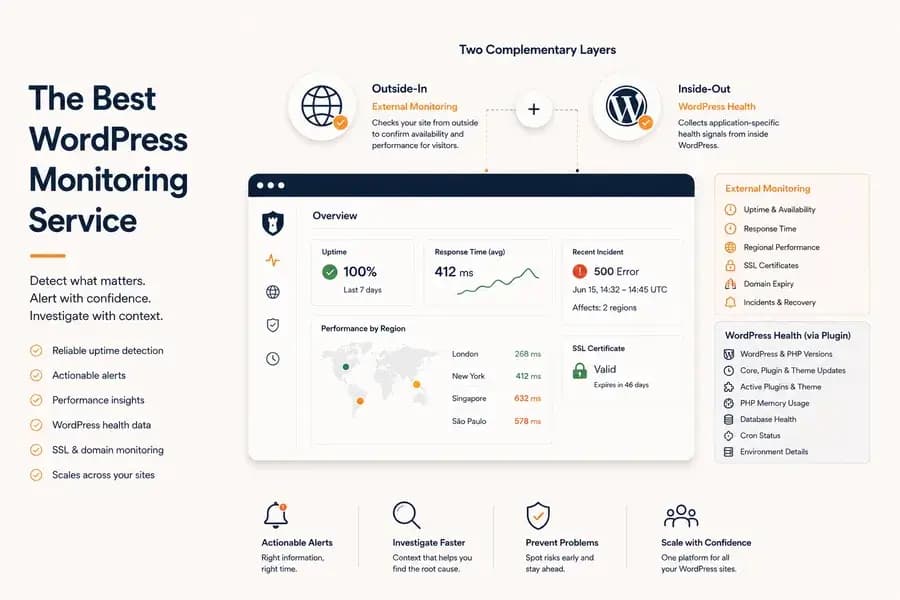
This model provides two complementary views:
- Outside-in visibility: what visitors and connected services experience
- Inside-out context: what is happening within the WordPress installation
For teams that need both dependable incident detection and deeper application context, this is often the most complete approach.
The practical differences are covered in detail in WordPress monitoring plugin.
Hosting-Native Monitoring
Many hosting providers include a monitoring dashboard for the WordPress sites on their infrastructure: resource usage, hosting-level availability, PHP or database logs and backup status.
That data is useful, but it stops at the provider's boundary. An agency with sites at several hosts ends up with different metrics, alert rules and retention periods for each one. Independent monitoring gives every site the same operational layer wherever it is hosted.
Self-Hosted Monitoring Tools
Technical teams can also run their own monitoring system. Self-hosting gives control over configuration, data retention and integrations, which matters for teams with specific compliance or data-control requirements.
The trade-off is that the team now maintains the monitoring infrastructure as well: securing it, keeping it available, configuring alert delivery and checking that the monitor itself can be trusted. For many agencies and small development teams a managed service removes that burden.
Start with Independent Uptime Detection
The first responsibility of a WordPress monitoring service is to tell you when the public website cannot be reached.
Look for checks that run independently of:
- WordPress
- PHP
- The origin server
- The hosting provider’s internal status
A service that depends entirely on a WordPress plugin has the same failure boundary as the application. If the server stops responding or PHP cannot execute, the plugin may be unable to report anything.
Independent external monitoring should record more than a binary up-or-down value. Useful incident data includes:
- Failure time
- HTTP status or connection error
- Failed monitoring regions
- Incident duration
- Recovery confirmation
- Response behaviour before and after the outage
Evaluate How the Service Confirms Incidents
Fast alerts are valuable only when they are trustworthy.
A single failed request should not always create an incident. Temporary packet loss, a short deployment interruption, or a regional network problem can produce isolated failures that recover immediately.
A strong monitoring service should use confirmation logic before declaring downtime. It should also distinguish between:
- A single failed check
- A confirmed outage
- A degraded but reachable site
- A regional failure
- A recovered incident
This reduces alert fatigue and makes it less likely that teams will mute or ignore notifications over time.
Look at Alert Quality, Not Just Notification Channels
Email, Slack, SMS, and push notifications are useful delivery options, but the channel alone does not determine alert quality.
A useful alert should tell the recipient:
- Which WordPress site is affected
- When the problem began
- What type of failure was detected
- Whether the problem is confirmed
- Which regions are affected
- Whether the site has recovered
The service should also support a notification workflow appropriate to the team. A solo site owner may need one email or push notification. An agency may need different sites or incident types routed to different people.
The difference between raw notifications and a usable incident workflow is explored further in WordPress uptime monitoring and alerting.
Measure Performance, Not Just Availability
A WordPress site can remain online while becoming progressively slower. Visitors experience longer loading times, abandoned purchases increase, and search engines may interpret persistent latency as a quality problem.
A capable monitoring service should therefore track response time continuously instead of reporting only complete outages.
Look for visibility into:
- average response time trends
- sudden latency spikes
- recurring slow periods
- regional performance differences
- degradation before an incident occurs
These signals often appear long before a website becomes completely unavailable, giving teams time to investigate while visitors are still able to use the site.
If performance is one of your priorities, continue with WordPress Performance Monitoring.
Don't Ignore SSL and Domain Monitoring
WordPress itself may be perfectly healthy while visitors still cannot access the website because another dependency has failed.
Examples include:
- expired SSL certificates
- expired domains
- DNS configuration problems
- certificate validation failures
These problems occur outside WordPress but have exactly the same business impact as application downtime.
The best monitoring services treat SSL and domain health as part of the overall reliability workflow rather than as separate utilities.
Our SSL Monitoring for WordPress guide explains why certificate monitoring should be part of every production deployment.
WordPress Health Information Should Be Optional—Not Required
WordPress-specific health data can dramatically improve troubleshooting, but it should complement external monitoring rather than replace it.
Useful internal visibility may include:
- pending WordPress updates
- PHP version information
- plugin inventory
- Cron status
- REST API health
- PHP memory usage
- database health indicators
These signals explain why a site is becoming unhealthy, while external monitoring confirms whether visitors are actually affected.
This layered approach is discussed in more detail in WordPress monitoring plugin.
Agencies Need Different Features Than Single-Site Owners
Managing one WordPress site and managing fifty are completely different operational problems.
Agencies and freelancers typically benefit from:
- centralized dashboards
- bulk site onboarding
- consistent alert routing
- unified SSL and domain tracking
- historical incident reporting
- standardized workflows across clients
The goal is no longer simply detecting downtime. It is reducing the operational effort required to monitor many independent WordPress installations.
If you manage client websites, the WordPress Monitoring for Agencies page explains this workflow in more detail.
Comparing Different Types of Monitoring Services
| Capability | External Monitoring | WordPress Plugin | Hybrid Platform |
|---|---|---|---|
| Detect public downtime | ✓ | Limited | ✓ |
| Response time monitoring | ✓ | Limited | ✓ |
| SSL monitoring | ✓ | ✗ | ✓ |
| Domain expiry monitoring | ✓ | ✗ | ✓ |
| WordPress updates | ✗ | ✓ | ✓ |
| PHP memory visibility | ✗ | ✓ | ✓ |
| Cron monitoring | ✗ | ✓ | ✓ |
| Independent uptime verification | ✓ | ✗ | ✓ |
Six Questions for Comparing WordPress Monitoring Tools
Tools are easier to compare against the same operational questions than by the length of their feature lists:
- Independence. Does it keep detecting incidents when WordPress itself cannot respond?
- Signal quality. Does it surface signals that reduce uncertainty, or just collect more data to interpret?
- Alert quality. Do alerts arrive quickly, carry enough context to act on, and avoid false positives through confirmation?
- Diagnostic context. After detection, does it help explain why, by combining performance data, WordPress health, SSL status and incident history?
- Scalability. Does it stay manageable at one hundred sites, not just one?
- Onboarding. Can a new site be added quickly and in the same way as the others?
Where Watchman Tower Fits
Watchman Tower follows a hybrid monitoring model.
Every monitored site begins with independent external checks for uptime, response time, SSL certificates, domain expiration, and public availability.
Teams that want deeper application visibility can then connect the optional WordPress plugin to add internal health information such as updates, Cron status, database health, PHP memory usage, and environment details.
Because these two monitoring layers remain independent, incidents can still be detected even when WordPress itself is unavailable, while internal signals provide the context needed to diagnose the root cause more quickly.
Choosing the Right WordPress Monitoring Service
The best WordPress monitoring service is rarely the one with the most features. It is the one that helps your team detect meaningful problems early, understand what happened, and respond with confidence.
For most production websites, that means starting with reliable external monitoring and adding WordPress-specific health signals only where they improve operational visibility.
Instead of choosing between plugin monitoring and external monitoring, choose a platform that allows both to work together.
Free plan available. No credit card needed.
FAQ
What makes a WordPress monitoring service the best?v
What are the main types of WordPress monitoring services?v
Why is independent uptime detection important?v
What distinguishes high-quality alerts in WordPress monitoring?v
Why monitor performance beyond just uptime?v
Should SSL and domain monitoring be part of WordPress monitoring?v
Blog Posts
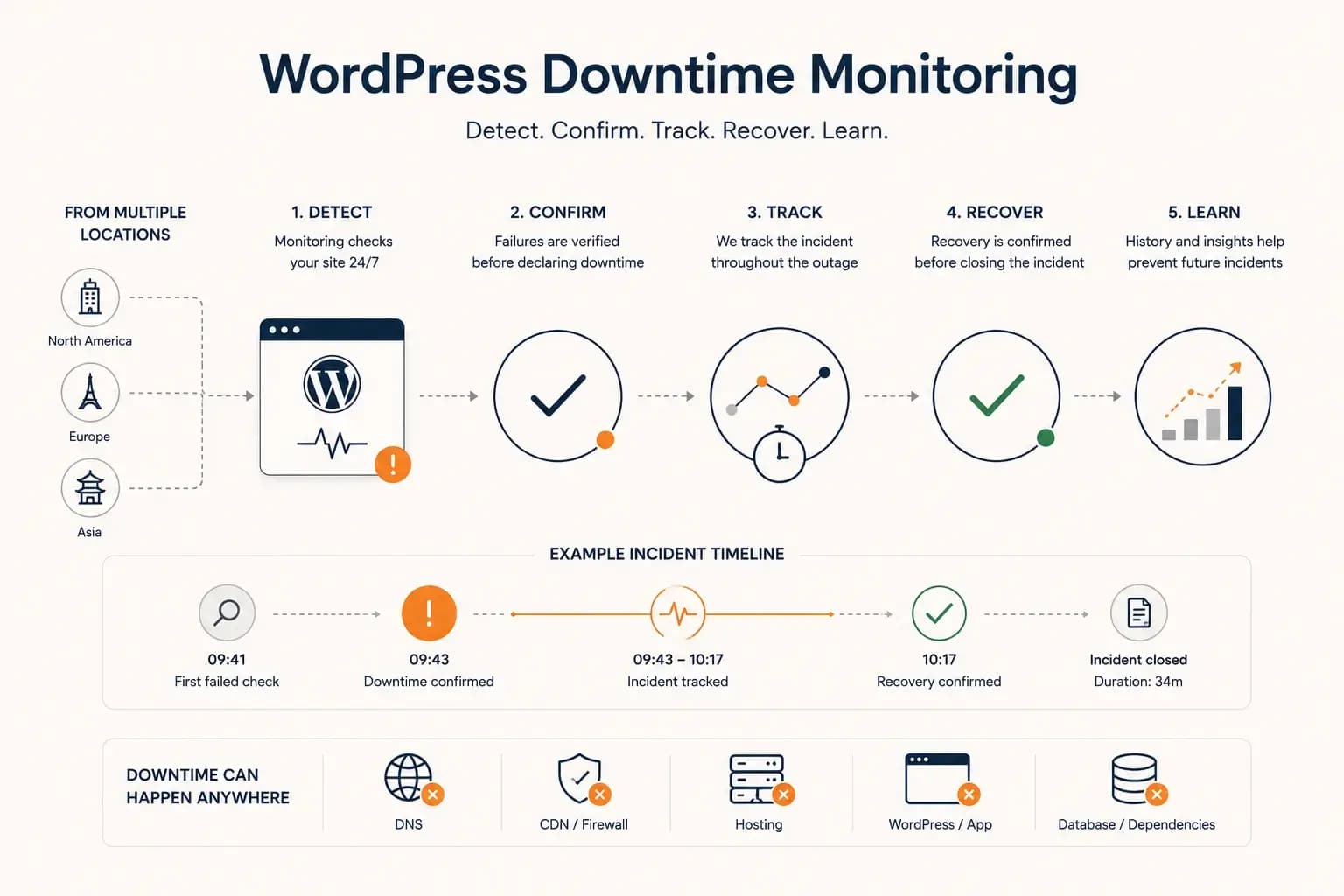
WordPress Downtime Monitoring: How to Detect and Track Outages...
WordPress downtime monitoring goes beyond detecting a failed request. Learn how to confirm real outages, track incidents, verify recovery, and use downtime history to improve reliability.
Learn more about WordPress Downtime Monitoring: How to Detect and Track Outages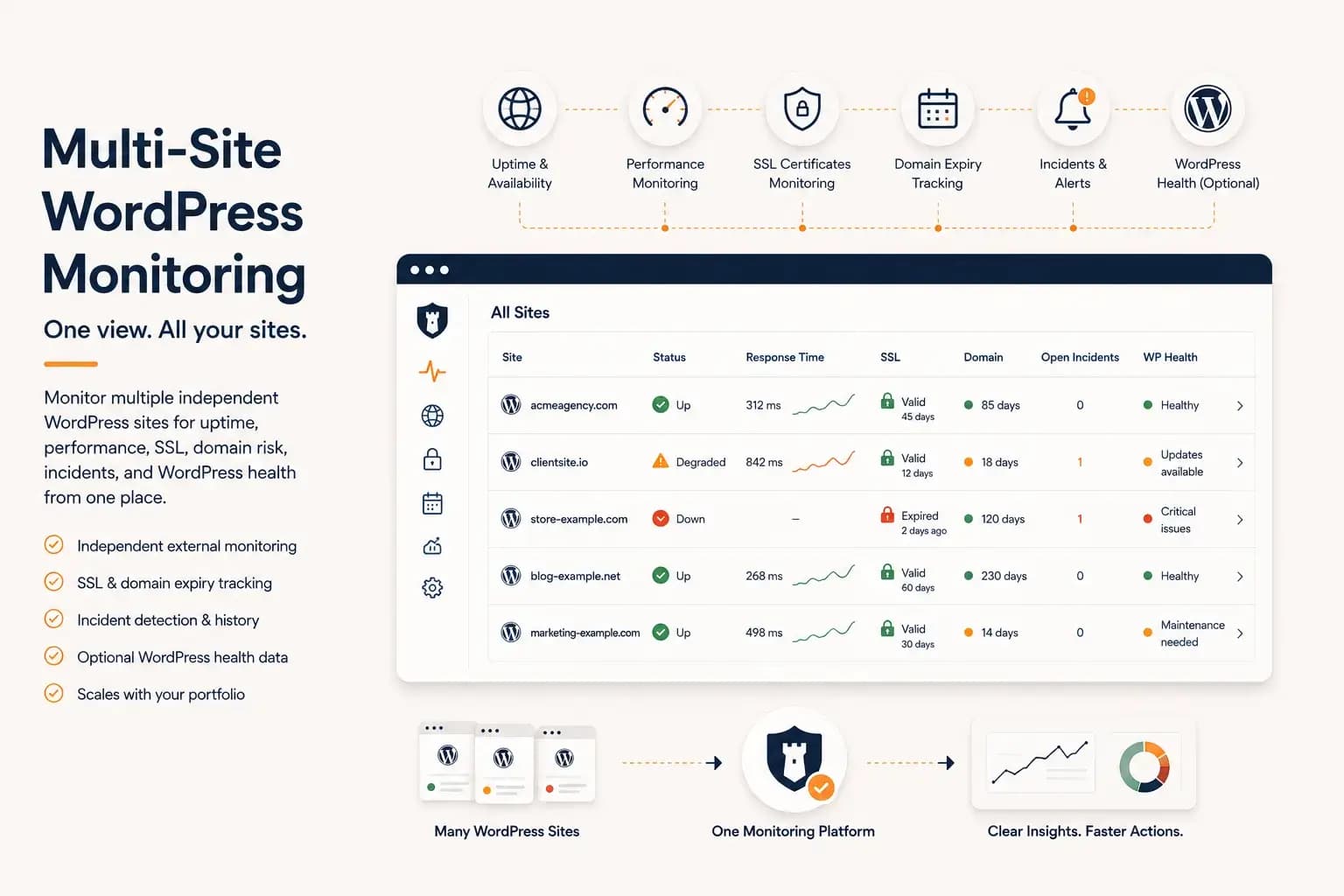
WordPress Multi-Site Monitoring: Manage Multiple Sites Efficiently...
Managing multiple WordPress websites requires more than uptime checks. Learn how to centralize monitoring, reduce operational overhead, and gain visibility into performance, SSL, domains, and WordPress health from a single dashboard.
Learn more about WordPress Multi-Site Monitoring: Manage Multiple Sites Efficiently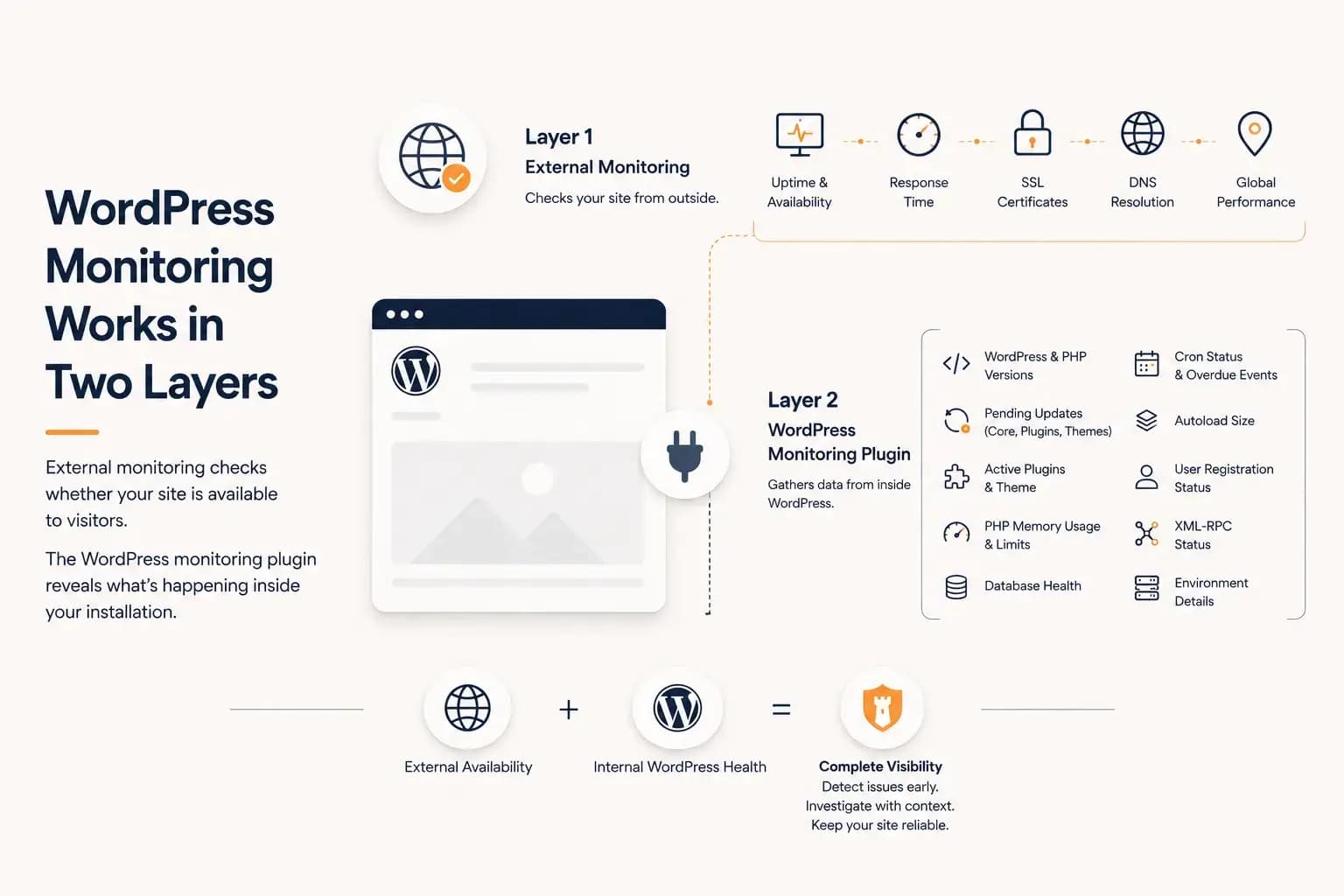
WordPress Monitoring Plugin: What It Tracks and What It Misses...
A WordPress monitoring plugin reveals application-level health such as updates, PHP memory, database status, cron activity, and plugin inventory. This guide explains what it can monitor, what it cannot see, and why it works best alongside external monitoring.
Learn more about WordPress Monitoring Plugin: What It Tracks and What It Misses